Your Guide to Creating NSFW AI Drawings
Discover how to create stunning NSFW AI drawings with this guide. Learn the best tools, prompts, and techniques to generate high-quality adult art.
NSFW AI drawings are exactly what they sound like: adult-themed images created using artificial intelligence. These tools take simple text descriptions, called prompts, and turn them into completely unique pieces of visual art. The best part? You can get incredibly specific, letting you create exactly what you have in mind in just a few seconds.
Exploring the World of NSFW AI Drawings
We've entered a completely new era for adult-oriented content. It's all being driven by powerful AI models capable of generating everything from artistic anime characters to portraits so realistic you'd swear they were photos.
This technology has torn down the barriers to entry. You don't need years of art school or expensive software to bring your ideas to life. If you can describe it, the AI can probably create it. It’s a simple process at its core—you feed the AI a detailed description, and it interprets your words to build an image from scratch. This opens up a world where the only real limit is your own imagination.
Why Artists and Enthusiasts Are Turning to AI
The draw of using AI for adult art is pretty clear, and it comes down to a few key reasons. For some, it’s about finally being able to explore creative concepts that would be incredibly difficult or time-consuming to produce by hand. For others, it’s a way to create deeply personal art while maintaining total privacy.
Here’s a quick look at why so many people are diving in:
- Unrestricted Creativity: AI platforms give you a sandbox to play in. You can experiment with any style, theme, or subject without the kind of content filters you'll find on mainstream art websites.
- Speed and Efficiency: A drawing that might take a human artist hours, or even days, can be generated by an AI in less than a minute. This means you can try out dozens of ideas in a single afternoon.
- Accessibility for All: You absolutely do not need to be a professional artist. Anyone with an idea can jump onto platforms like CreateInfluencers and start making stunning visuals right away.
- Customization and Control: The level of control you have is incredible. Modern AI tools let you fine-tune everything from a character's appearance and clothing down to the specific lighting and mood of the entire scene.
The ability to generate highly realistic explicit images raises profound questions about privacy, consent, and the potential for abuse. Understanding both the capabilities and limitations is key to using these tools responsibly.
The Technology Behind the Art
This explosion in AI-generated art didn't happen by magic. It's the direct result of huge leaps in machine learning, especially with models like Stable Diffusion. The demand is undeniable—the global AI image generator market was valued at USD 349.60 million in 2023.
And it's not slowing down. Experts project it will hit USD 1.08 billion by 2030, a growth powered by the billions of images these models are churning out daily. This shift has made it possible for anyone to become a creator, completely changing the game for digital art and content creation.
Before we dive deeper, it helps to get familiar with a few core ideas.
Core Concepts in NSFW AI Art Generation
Here's a quick rundown of the key terms and technologies you'll come across when making AI drawings. Think of it as your cheat sheet.
| Concept | What It Means for Your Art | Example Platform Feature |
|---|---|---|
| Generative Model | The "engine" that creates the image. Different models have different styles (e.g., realistic vs. anime). | Selecting between "Hyper-Realistic" or "Anime V2" models. |
| Prompt | Your text description telling the AI what to create. This is where your creativity comes in. | The main text box where you type your description. |
| Negative Prompt | A list of things you don't want to see in the image, helping to refine the final output. | An input field labeled "Exclude from image" or "Negative Prompt." |
| Sampling Method | The algorithm the AI uses to build the image. Different samplers can affect image quality and detail. | A dropdown menu with options like Euler a, DPM++, or DDIM. |
| CFG Scale | A setting that controls how closely the AI sticks to your prompt. Higher values mean less creative freedom for the AI. | A slider usually labeled "Prompt Guidance" or "CFG Scale." |
Getting a handle on these concepts is the first step toward mastering the art of AI generation and getting the exact results you're looking for.
Setting Up Your AI Art Workspace
Jumping into nsfw ai drawings is pretty exciting, but a little prep work up front can save you a world of headaches later on. Think of it like stretching before a workout—it just makes everything go smoother. The first thing you'll do on any platform, and CreateInfluencers is no different, is get signed up. It’s the usual process: pop in your email, and you’re in with a free account.
Right away, you'll see options for different subscription plans. The free versions are perfect for getting your feet wet and figuring out how everything works. Just be aware they usually cap how many images you can make or put you in a slower queue. If you're serious about creating top-notch art, a paid plan is the way to go. It’s what gets you faster generation, higher resolutions, and access to the best AI models.
Getting a Feel for the Interface
The main dashboard might look like a cockpit at first, but it's all there for a reason. Your two most important tools are the prompt and negative prompt boxes. This is where the magic happens—you tell the AI what to create and, crucially, what not to. For instance, AI has a notorious problem with hands. A pro-tip from day one is to add things like "deformed hands, extra fingers, mutated hands" to your negative prompt. It cleans up a lot of otherwise great images.
You’ll find the other key controls in a sidebar or a menu somewhere. Get familiar with these:
- Model Selection: This is where you pick the brain of the AI. Do you want something photorealistic? Or a specific anime style? The model determines the entire aesthetic.
- Resolution/Aspect Ratio: Here, you set the canvas size. Common choices are square (1:1), portrait (2:3), or landscape (3:2).
- Generation Count: This lets you generate multiple images from one prompt at the same time. I usually set it to 4 so I have a few options to choose from.
This infographic really simplifies the whole setup process into three clear stages.
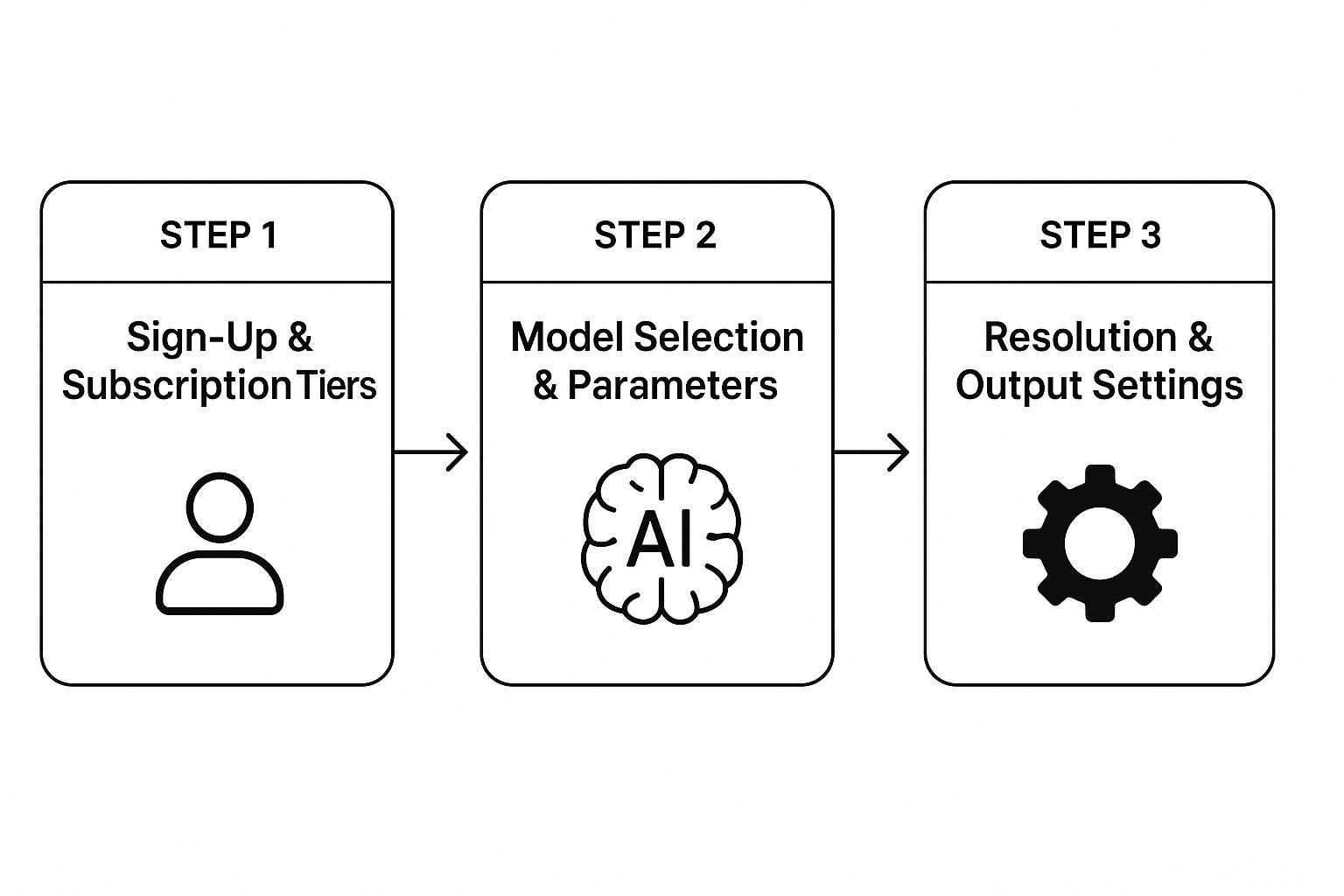
As you can see, it’s a natural progression from just getting an account to actually dialing in the settings that will define your artwork.
Key Settings to Nail Down Early
Once you’re comfortable with the basics, it’s time to look for an "Advanced Settings" tab. This is where you really start to take control over your nsfw ai drawings. You'll find a couple of sliders that are incredibly powerful: CFG Scale and Sampling Steps.
The CFG Scale basically tells the AI how strictly it needs to follow your prompt. A low value gives it more room to get creative, which can be fun but unpredictable. A higher value makes it stick to your instructions like glue.
Sampling Steps dictates how many times the AI refines the image before showing it to you. More steps can add more detail and polish, but it also takes longer. Finding the sweet spot here is key.
Getting a feel for these core settings is what separates someone who's just clicking buttons from an artist who's intentionally crafting an image. My advice? Dedicate your first few sessions to just messing with these sliders. See what happens when you crank them up or dial them way down.
By taking the time to explore your workspace, you’re not just learning a piece of software. You’re building the skill set needed to bring your creative vision to life. So go on, click every button.
Mastering the Art of the NSFW AI Prompt
The prompt is everything when it comes to creating compelling nsfw ai drawings. It’s the direct conversation you have with the AI, and getting it right is what separates a generic, forgettable image from a truly stunning piece of art.
I like to think of the AI as an incredibly talented artist who is also extremely literal. It can only paint what you describe. A lazy prompt gets you a lazy result. But a well-crafted prompt? That contains the DNA for a masterpiece. It's about moving beyond simple phrases and learning to think in layers of detail.
The Anatomy of a Powerful Prompt
To get the hang of writing great prompts, it helps to break them down into their essential parts. Each piece you add gives the AI another layer of direction, steering it closer to what's in your head. Instead of just typing "woman on a beach," you build the scene element by element.
- Subject and Appearance: This is your main character. Get specific. Don't just say "red hair"—say
long flowing crimson hair. Mentionpiercing green eyes, anathletic build, or even an expression likea playful smirk. The details make all the difference. - Action and Pose: What are they doing? Static poses are fine, but dynamic action creates more interesting images. Try active phrases like
lounging seductively on a velvet chaise loungeoradjusting her silk robe. - Setting and Environment: Where is all this happening? The location sets the entire mood.
A dimly lit, opulent bedroom with moonlight streaming through the windowis a world away from justin a room. - Artistic Style: This is a huge one. Are you going for a
photorealisticimage that could pass for a photo? Or maybe something more artistic, like afantasy oil paintingorclassic anime style? You can even get creative and blend them together.
When you layer these components, you're essentially handing the AI a detailed blueprint. Every detail you add sharpens the focus and gives you more control over the final image.
From Vague Ideas to Vivid Images
Let's put this into practice and see how a few tweaks can completely transform an image. A simple, barebones prompt will almost always give you a simple, uninteresting result. The magic happens when you start weaving in those descriptive keywords.
Take a basic prompt like: woman in lingerie. Sure, the AI will generate something, but it'll probably be pretty generic. Now, let’s beef that up using the building blocks we just talked about.
Example 1: The Enhanced PromptA photorealistic portrait of a woman with long raven hair and blue eyes, wearing intricate black lace lingerie, posing on a satin sheet bed, soft morning light from a window, intimate and sensual mood.
See the difference? This prompt gives the AI specific instructions on appearance, clothing, setting, lighting, and mood. The quality of the final image will be night and day compared to the original, simply because you left less to chance.
The real skill in prompt writing is learning how to be both specific and concise. You want to provide enough detail to guide the AI without overwhelming it with contradictory or confusing terms. It's a balance of art and science.
For a deeper dive into crafting prompts and other advanced techniques, you can explore the various tutorials in our guides section, which cover a wide range of topics to help you get the most out of the platform.
Using Style Keywords for Impact
Style keywords are your secret weapon for nailing a specific aesthetic. Think of them as powerful modifiers that can instantly change the entire vibe of your nsfw ai drawings. Playing around with different style keywords is one of the quickest ways to find your own unique artistic voice.
Here are a few common ones I use all the time and what they do:
| Style Keyword | Expected Outcome | Best For... |
|---|---|---|
| Photorealistic | Creates an image that looks like a real photograph. | Lifelike portraits and realistic scenes. |
| Anime | Generates art in the style of Japanese animation. | Stylized characters with vibrant colors. |
| Oil Painting | Mimics the texture and brushstrokes of a classic painting. | Creating a timeless, artistic feel. |
| Cinematic Lighting | Adds dramatic, movie-like lighting and shadows. | High-impact, moody, and atmospheric shots. |
| Low Angle Shot | Renders the scene from a camera positioned below the subject. | Creating a sense of power and dominance. |
And don't be shy about mixing and matching them. A prompt that includes cinematic lighting, photorealistic, low angle shot can produce something incredibly dramatic and professional-looking. The more you experiment with these terms, the more intuitive the whole process becomes.
Refining Your Creations with Advanced Techniques
https://www.youtube.com/embed/No1_sq-i_5U
Getting your first decent image out of the AI is a great start, but that's really just the beginning. The real magic in creating professional-level nsfw ai drawings happens in the refinement stage. This is where you move beyond just the initial prompt and start using tools that give you surgical control over the final picture. Think of it as moving from a rough sketch to a polished piece of art.
The Power of Negative Prompts
One of the most powerful and often overlooked tools is the negative prompt. Your main prompt tells the AI what to create, but the negative prompt tells it what not to create. This is your secret weapon for cleaning up all those classic AI quirks—misshapen hands, extra limbs, weirdly distorted faces, you name it.
Making a solid negative prompt a standard part of your workflow will change everything.
I have a go-to negative prompt I use as a base for almost every image. It includes things like:
mutated hands, extra fingers, deformed, blurry, bad anatomy, disfigured, poorly drawn face, extra limbs. Just adding that simple string of text can dramatically clean up your results and save you from having to reroll an image a dozen times.
Once you have an image you're happy with, you’ll probably want to share it or save it. It's worth looking into techniques for compressing images without losing quality to make sure your art looks sharp and loads quickly wherever you post it.
Making Precision Edits with Inpainting and Outpainting
Ever generate an image that's almost perfect? Maybe there's a strange-looking eye, an odd object in the background, or a piece of clothing that just doesn't sit right. That’s exactly what inpainting is for.
With inpainting, you can select a specific part of your image, mask it off, and have the AI regenerate only that section based on a new prompt. The rest of your image stays exactly the same. For example, if a character’s expression is a little off, you can just mask their face, type in a new prompt like seductive smile, and let the AI fix that one detail. It’s an incredibly efficient way to make targeted changes without starting over.
On the flip side, you have outpainting, which lets you expand your canvas. Let’s say you generated a fantastic portrait, but now you wish it was a wider, more scenic shot. Outpainting allows the AI to intelligently build out the image, extending the background and composition in a way that feels completely natural.
Fine-Tuning with Advanced Generation Parameters
Beyond just editing the final image, you can get a lot more control by tweaking the generation parameters before you even hit "create." These settings give you a much deeper say in how the AI interprets your prompt from the very start.
Two of the most important settings to get familiar with are:
- Sampling Steps: This tells the AI how many times to refine the image as it’s being generated. A lower number (like 20-30) will be faster, but a higher number (50+) can produce much more detailed and polished results. You'll hit a point of diminishing returns, but it's worth experimenting with.
- CFG Scale (Classifier-Free Guidance): This is basically a slider that controls how strictly the AI has to follow your prompt. A lower value gives the AI more creative freedom, which can result in some beautifully artistic, but less accurate, images. A higher value forces the AI to stick to your instructions to the letter, which is perfect when you have a very specific vision in mind.
Mastering these advanced techniques is what separates simple AI generations from deliberate, well-crafted works of art.
Navigating Content Safety and Ethical Guidelines
The freedom that comes with making NSFW AI drawings is incredible, but it's a power that demands we act responsibly. Let's be clear about the most important line in the sand: consent.
You should never, ever generate images of real people without their direct permission. This isn't just about private individuals; it includes celebrities and public figures, too. It’s a massive ethical breach and can land you in serious legal trouble.
Copyright is another tricky area. While the law around AI art is still catching up, prompting with a specific artist's name to copy their style is ethically questionable. Think of it as creating a derivative work without permission. A much better approach is to develop your own signature style. Describe the aesthetics, the mood, and the techniques you want, rather than just name-dropping another creator. It respects their work and forces you to become a better artist.
Understanding Platform Rules and Moderation
Every platform, CreateInfluencers included, has its own Terms of Service (ToS). It’s not just legal boilerplate; it's the rulebook for the community. Take the time to actually read it. These guidelines spell out exactly what's allowed and what could get your account shut down, potentially costing you all of your work.
With over 3.2 trillion AI-generated images and videos expected to flood the internet in 2024 alone, manual content review is simply impossible. Platforms are leaning heavily on automated moderation tools to scan for content that breaks the rules. These systems are constantly being updated to keep the community safe.
The core principle is simple: your creative exploration should never come at the expense of someone else's safety, privacy, or rights. Being a responsible creator ensures the community remains a positive and sustainable space for everyone.
As AI art becomes more widespread, it’s smart to understand how detection tools work. Knowing the accuracy of AI image detectors is valuable for creators and viewers alike.
For more insights on building a positive presence and navigating this space responsibly, we're always sharing tips and guides on our blog. You can check them out here: https://createinfluencers.com/blog. When we all commit to ethical practices, we don't just protect ourselves—we strengthen the entire digital art community.
Answering Your Top Questions About NSFW AI Drawings
When you first dive into creating nsfw ai drawings, a few questions always seem to pop up. Let's tackle some of the most common hurdles you might face so you can get straight to the good stuff.
What's the Secret to a Really Good Prompt?
A killer prompt is less about a single magic word and more about building a complete scene. You have to think like an artist or a photographer setting up a shot. Layer in the details: What's the subject's exact pose? What specific clothing are they wearing (or not wearing)? What does the room or environment look like?
Keywords are your best friend for setting the mood. Instead of just saying "dark," try cinematic lighting, chiaroscuro, or low-key lighting. The AI understands these more technical terms, and it gives you far more control over the final image than vague descriptions ever could.
How Do I Stop the AI from Mangling Hands and Limbs?
Ah, the classic AI art problem. This is where a solid negative prompt becomes non-negotiable. I have a standard list of terms I include in almost every generation to avoid common glitches.
Make it a habit to always include terms like:
deformed handsextra fingerspoorly drawnbad anatomymutated limbs
If you get a nearly perfect image but the hands are a mess, don't throw it away! This is exactly what the inpainting tool is for. You can mask just the messed-up hand and tell the AI to regenerate only that tiny section. It’s a game-changer for fixing minor flaws without having to reroll the entire image.
The rules around AI art are still being written, both legally and ethically. My best advice? Stick to creating original characters. Avoid prompts that use real people's names or copyrighted characters to keep yourself out of trouble. Always create responsibly.
Are There Any Real Legal Risks I Should Worry About?
Absolutely, and they boil down to two main things: copyright and consent. Never, ever create images of real people—celebrities included—without getting their explicit permission. It's not only an ethical nightmare but can land you in serious legal hot water.
Another gray area is using famous artists' names to copy their style. While it's a popular trick, it can be viewed as creating a derivative work, which has its own set of legal complications. The safest (and most creative) path is to develop your own unique concepts and styles. This ensures you're respecting ethical boundaries and staying compliant with the platform's rules.
Ready to bring your own unique characters to life? CreateInfluencers gives you all the tools you need to generate high-quality, fully customizable AI images and influencers in minutes. Start creating for free today at https://createinfluencers.com.