Discover nsfw ai art maker: Safe, Ethical, Creative Use
Learn to use a nsfw ai art maker responsibly with safety tips, prompting best practices, and ethical monetization ideas.
When you're serious about creating NSFW AI art, the best setup is a hybrid one. You'll want a powerful local tool like Stable Diffusion running on your own machine for total privacy and control. But you'll also want to lean on user-friendly cloud platforms for quick experiments and brainstorming. This two-pronged approach gives you the best of both worlds: complete creative freedom without censorship and the convenience of web-based tools for rapid ideation.
Why NSFW AI Art Is Suddenly Everywhere
The AI art scene has blown up, moving from a quirky tech niche to a major creative and commercial force. What started as just a few experimental projects has turned into a real industry, fueled by a massive appetite for custom, uncensored visual content.
This boom is especially pronounced in the adult art community. Creators have long been frustrated by the strict filters and content barriers on mainstream platforms, pushing them to find tools that offer more freedom. The numbers back this up: the AI image generation market was valued at around $349.6 million in 2023 and is on track to hit $1.08 billion by 2030. While this growth spans design, advertising, and entertainment, the NSFW niche has been a huge driver, with its constant demand for unique, personalized imagery.
This surge isn't just about creating explicit content—it's about artistic liberty. An nsfw ai art maker gives artists the power to explore themes of intimacy, fantasy, and the human form without the heavy-handed restrictions of mainstream AI services.
These specialized platforms typically offer a few key advantages:
- Unfiltered Models: You get access to AI models trained on wide-ranging datasets that aren't afraid of adult themes.
- Deep Customization: You can fine-tune every little detail, from character anatomy and specific poses to the exact lighting you want.
- Privacy and Ownership: Many tools let you run the models locally on your own computer, keeping your prompts and final creations completely private.
The Real Draw: Unfiltered Creativity
At its core, the demand for a dedicated nsfw ai art maker comes down to one thing: creative autonomy. Popular image generators like Midjourney or DALL-E 3 have rigid content policies that shut down any prompt mentioning nudity or sensitive topics. That makes sense for a general-purpose tool, but it's a brick wall for artists working with adult themes.
Unfiltered tools, on the other hand, put the power—and the responsibility—right where it belongs: with you, the creator. They operate on the simple idea that you should be the one to decide what you create.
With that kind of creative freedom comes a serious responsibility to be ethical. The principles of consent, privacy, and legal awareness are absolutely non-negotiable, especially when your art is based on or inspired by real people.
Getting the workflow right is key to balancing privacy with creative exploration. This diagram breaks down a solid process.
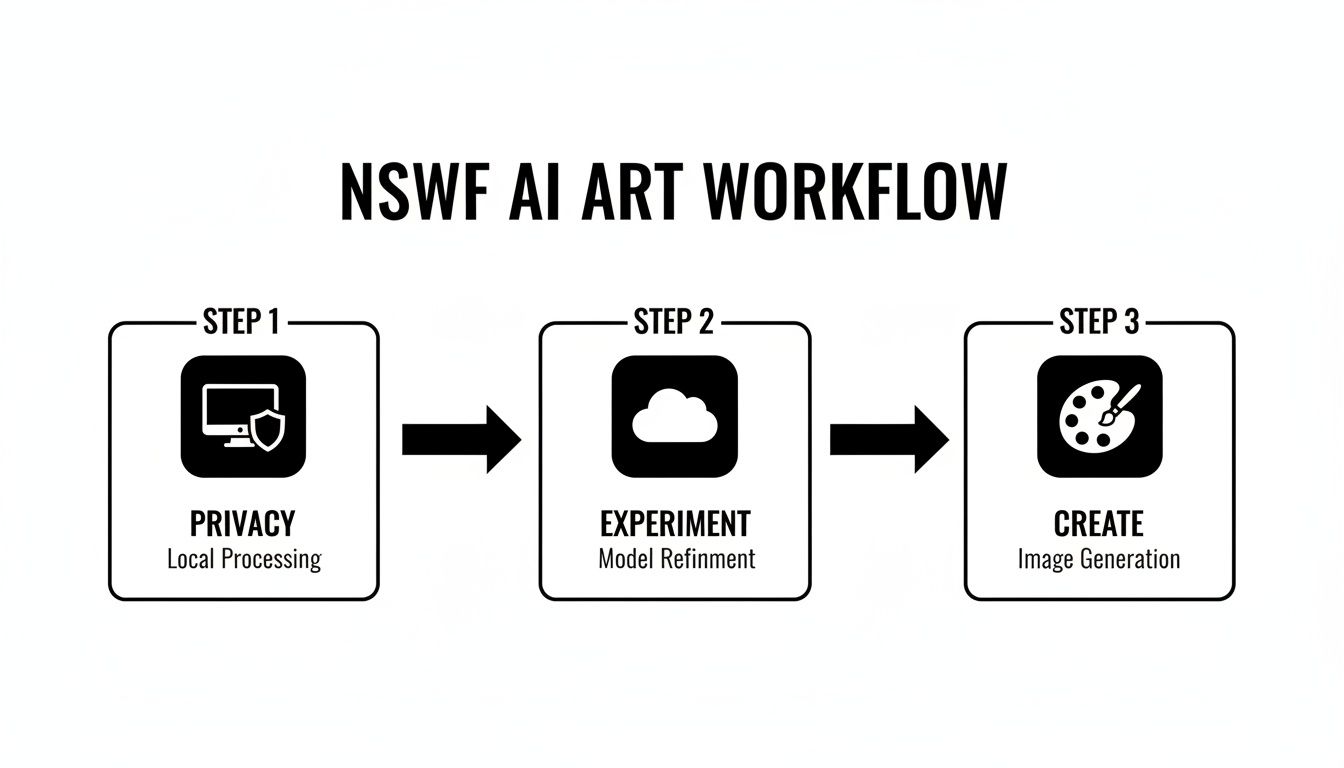
This workflow shows how you can use a local setup for your most sensitive projects while still using cloud platforms for lower-stakes experimentation. It's a smart, secure way to work. Mastering this balance is essential for making high-quality art while managing your risks.
And if you're thinking about building a brand around your work, checking out guides on how to create AI influencers can offer some great strategies for developing characters that are both consistent and compelling.
Choosing the Right AI Tool for Your Needs
The very first decision you'll make on this creative journey is picking your nsfw ai art maker. This choice really comes down to two main paths: running the software on your own computer or using a web-based service.
Each route has its own set of pros and cons—it’s a classic trade-off between privacy, cost, and control. Since this choice will define your entire workflow, let's dig into the details so you can figure out what makes the most sense for you.
The Local Installation Path
Going local means you install an AI art generator right on your own machine. The most popular choice by far is a user interface like AUTOMATIC1111, which acts as a powerful front-end for Stable Diffusion.
This path gives you the ultimate in privacy and creative freedom. Everything you do—your prompts, the images you create, any custom models you train—stays on your hard drive. No one else sees it. You have complete ownership and security.
But, that level of freedom has its demands.
- Hardware Demands: You're going to need a beefy graphics card (GPU). We're talking an NVIDIA card with at least 8GB of VRAM just to get decent performance. If you want to create high-resolution art or train your own models, you really should be looking at cards with 12GB or even 24GB of VRAM.
- Technical Learning Curve: This isn't exactly a plug-and-play experience. You'll be installing software, downloading and managing models, and figuring out what to do when things break. The community support is fantastic, but it's a hands-on process.
- Upfront Investment: That powerful GPU isn't cheap. It can set you back anywhere from a few hundred to over a thousand dollars, which is a big initial hit compared to a simple monthly subscription.
This is what a typical local setup looks like. This screenshot shows the AUTOMATIC1111 interface—it's dense, packed with options, and gives you a real sense of the granular control (and complexity) you're dealing with.
Key Takeaway: The local path is perfect for creators who refuse to compromise on privacy, want absolutely zero content filters, and are ready to invest the money and time to become true power users.
The Cloud-Based Service Path
Cloud-based platforms offer a completely different vibe, built around convenience and ease of use. These are websites where you just sign up, pick a plan, and start making art right in your browser. No beefy computer needed—just an internet connection.
This route is incredibly friendly for beginners. The user interfaces are usually clean and modern, hiding all the complicated technical stuff happening behind the scenes. But that convenience means you have to be extra careful about other things. When you're looking for a platform, it's a good idea to research the best AI content creation tools for creators to find one that fits your artistic vision and ethical standards.
Before you pull out your credit card for any service, you absolutely must do your homework on their policies:
- Subscription Costs: The pricing models are all over the place. Some use a credit system where you pay per image, while others have flat monthly subscriptions. Do the math based on how much you think you'll actually use it.
- Privacy Policies: This is the big one. You need to read the fine print. Dig into their terms of service to see how they handle your data. Do they use your prompts and images to train their own AI? Do you actually retain full ownership of what you create?
- Content Restrictions: Even platforms that market themselves as "unfiltered" often have hidden rules or community guidelines. Make sure their definition of acceptable content matches yours. For more tips on this, the articles over at https://createinfluencers.com/blog offer some great perspectives on navigating these platforms safely.
Ultimately, cloud services are a fantastic option if you want to dive in right away without the headache of hardware and setup, as long as you find a service with a privacy policy you can trust.
Mastering the Craft of NSFW Prompting
Your prompt is the magic wand. It's the difference between a blurry, generic image and a stunning piece of art. Just typing "woman in a room" is a recipe for disappointment. To really get what you want out of an nsfw ai art maker, you have to learn to speak its language—to guide it with detail and intention.
Think of yourself as a director on a film set. The prompt is your script, your shot list, and your lighting instructions all rolled into one. The more specific and vivid your directions, the closer the AI will get to bringing your vision to life.
The Anatomy of a Killer Prompt
A truly effective prompt isn't just a list of keywords; it’s a recipe. Each ingredient adds a crucial layer of information, telling the AI precisely what to build. If you leave out key components, you’re leaving the final result up to chance, which usually means a flat, uninspired image.
Here are the essential building blocks I always include:
- The Subject: This is your star. Describe the person, their features, what they’re wearing (or not wearing), and their expression. Use rich, descriptive words. Is she "pensive," "smirking," or "serene"?
- The Setting: Where is all this happening? An opulent bedroom with silk sheets? A rain-soaked back alley? A minimalist futuristic lounge? The environment creates the entire mood.
- Style & Medium: This is a big one. Are you going for a "cinematic photo," a moody "oil painting," a sharp "comic book illustration," or a classic "anime cel"? Specifying the style is non-negotiable.
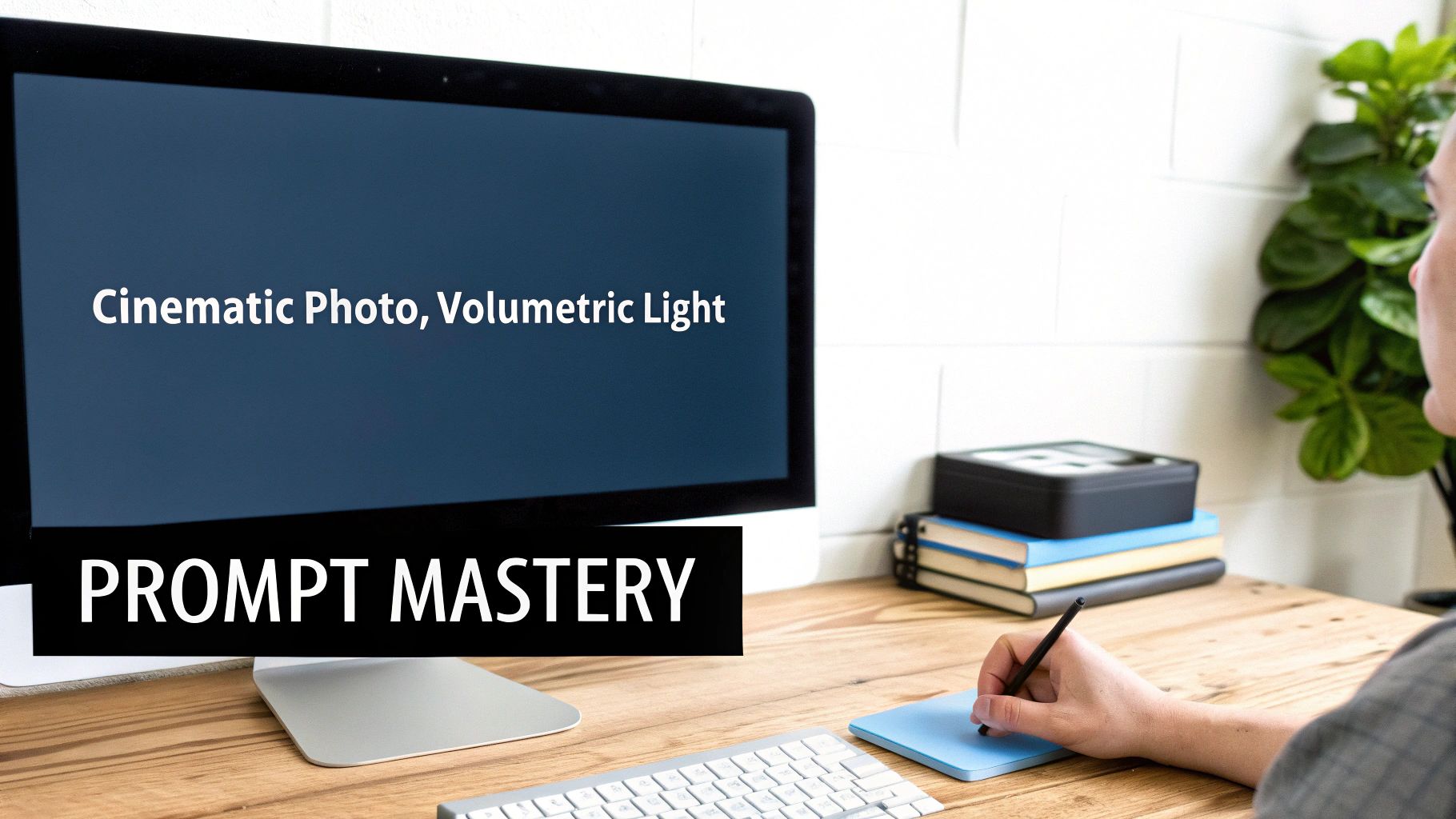
- Lighting: Lighting is everything for mood and drama. Try using terms like "volumetric light," "soft shadows," "dramatic backlighting," or the classic "golden hour" to paint with light.
- Composition: Now, direct the camera. Tell the AI what kind of shot you want: a "full body shot," an intimate "close-up portrait," or a classic "cowboy shot." Don't forget the angle—is it a powerful "low angle" or an observational shot "from above"?
- Details & Quality: To really push the final render, add quality-boosting keywords. I often use "hyperrealistic," "intricate details," "8k," and "sharp focus" to get the crisp results I'm looking for.
An Example: From Vague Idea to Vivid Art
Let's walk through how this works in practice. We'll start with a generic idea and layer on details until we have a prompt that an nsfw ai art maker can turn into something special.
The Basic Idea:
a woman in lingerie
This is way too vague. The AI has to make a dozen guesses about style, lighting, and setting. You’ll get something, but it probably won’t be what you pictured.
Adding Some Style and Detail:
cinematic photo of a beautiful woman in detailed black filigree lingerie
Much better. Just by adding "cinematic photo" and specifying the type of lingerie, we've given the AI much-needed direction. The quality will jump significantly.
Building the Full Scene:
Prompt: cinematic photo, a beautiful woman in detailed black filigree lingerie, sitting on the edge of a bed in a dimly lit room, volumetric light streaming through a rain-streaked window, soft shadows, hyperrealistic skin texture, sharp focus, 8k
Now that's a prompt. It’s a complete set of instructions. It defines the subject, their action, the setting, the specific lighting, and the level of quality. The difference between the first and last prompt is the difference between a random, soulless snapshot and a piece of intentional art. For creators looking to dive deeper into these techniques, exploring detailed creator guides can provide structured learning paths and advanced tips.
The Hidden Power of Negative Prompts
Telling the AI what you want is only half the battle. You also have to tell it what you don’t want. That's where negative prompts come in. AI models are notorious for certain flaws—think mangled hands, extra fingers, distorted faces, or ugly watermarks. A negative prompt is your quality control.
A strong negative prompt acts like a filter. It cleans up the final image by removing common AI artifacts and stylistic elements you want to avoid, saving you tons of time on rerolls.
Here's a great starter negative prompt that I use all the time:
deformed, ugly, disfigured, bad anatomy, extra limbs, mutated hands, worst quality, low quality, blurry, watermark, signature, text
You can also get more specific. If your images are coming out too cartoonish when you're aiming for realism, just add anime, cartoon, drawing, illustration to your negative prompt. Don't sleep on this part of the process—mastering it is key to getting consistent, high-quality images.
Navigating Ethical and Legal Boundaries
Wielding an nsfw ai art maker gives you incredible creative freedom, but that power comes with a heavy dose of responsibility. This isn't just about making cool art; it's about making it ethically and legally. The lines here are bright and clear, and ignoring them is a mistake you don't want to make.
The absolute cornerstone of ethical creation is consent. It’s the non-negotiable foundation. You should never, ever use these tools to generate non-consensual images of real people. Doing so is a profound violation of their privacy and has serious real-world consequences that go way beyond just getting your account suspended.
Many places now have specific laws against creating and distributing non-consensual intimate imagery (NCII), often called "deepfake" laws. These come with severe legal penalties, including hefty fines and even jail time. Respecting someone’s digital likeness isn't a suggestion—it's a legal command.
Understanding Consent and Digital Likeness
For consent to be valid, it has to be explicit, informed, and freely given. This means if you’re using the likeness of a real person—even yourself or a model who agreed to work with you—you need clear, documented permission for that specific purpose. Vague assumptions don't cut it.
Let's break it down with a few scenarios:
- Using a photo of a friend without asking? That's a direct violation. Even if you don't mean any harm, you're creating an image of them they never agreed to.
- Training a model on a public figure? This gets legally complicated. It’s a gray area that can easily lead to legal challenges over the right of publicity or defamation.
- Working with a consenting model? This is the correct, ethical path. Make sure you get a signed model release that explicitly covers creating and distributing AI-generated images based on their likeness.
Drawing parallels from other fields can be helpful. For instance, the principles of academic integrity in the age of AI offer a solid framework, emphasizing originality and respect for the rights of others.
Navigating Platform Policies and Content Moderation
Beyond the law, you have to play by the rules of the platforms you use. Every place you might share or sell your art, from X (formerly Twitter) to Patreon, has its own Terms of Service. Violating them is the quickest way to get banned and lose your community overnight.
These platforms aren't messing around. As AI tools became more powerful, regulators and the platforms themselves started prioritizing content safety—spurred by rules like the EU Digital Services Act (DSA). This led to a boom in sophisticated moderation tools that can detect NSFW content, faces, and even brand logos to reduce their own legal risk.
Important Takeaway: Always read the content policies of any platform you plan to use. "I didn't know" is never a good defense. What's perfectly fine on one site could be an instant ban on another.
The Murky Waters of AI Art Copyright
Finally, you have to think about copyright. Who actually owns the art you create with an nsfw ai art maker? Honestly, the answer is complicated and still being hammered out in court. In the U.S., for example, the Copyright Office has generally stated that purely AI-generated images without significant human authorship can't be copyrighted.
This means that while you can sell your art, you might not have the legal muscle to stop other people from using it. What's more, the legality of the AI models themselves is a hot-button issue. To stay on the safe side, always try to use models that were trained on ethically sourced datasets. Your creative journey has to be built on a foundation of respect—for people, for platforms, and for the law.
Turning Your AI Art Into a Revenue Stream
Making stunning NSFW AI art is a blast, but what if it could also pay the bills? Turning this creative passion into a real income source is totally possible. It’s not just about posting pretty pictures, though. You need a solid game plan that involves building a recognizable brand, connecting with an audience, and picking the right spots to sell your work.
A lot of creators I know get their start on subscription sites like Patreon or Fansly. These platforms are great because they let you build a direct line to your biggest fans, offering them exclusive content for a monthly fee. This creates a steady, predictable income, which is a whole lot better than chasing one-off sales. The trick is to create membership tiers that feel genuinely valuable at each price point.
For instance, you could have a basic tier that gives people a sneak peek at your latest creations. A higher tier might unlock full-res image packs. And for your top supporters? Maybe you offer something really special, like a behind-the-scenes look at your process or custom commissions using your go-to nsfw ai art maker.
Building Your Subscription Empire
A killer subscription service is built on two things: consistency and community. Your subscribers are backing you, not just your art. So, keeping a steady stream of amazing work coming is absolutely crucial for keeping them around.
Here’s a practical way you could structure your tiers:
- Entry-Level Tier ($3-$5/month): This is how you get people in the door. Offer a private feed, early access to new art, and maybe let them vote on what you create next.
- Mid-Level Tier ($10-$15/month): This will likely be your bread and butter. It should have everything from the basic tier, plus full high-resolution galleries and maybe an invite to a private Discord server.
- Premium Tier ($25+/month): This one’s for your superfans. Think exclusive, unreleased art sets, personal shout-outs, or even one-on-one chats about your creative techniques.
This setup lets fans support you at a level that works for them and gives you a clear roadmap for what you need to create.
Pro Tip: Don't just post and ghost. Get in there and chat with your community in the comments or on Discord. When supporters feel seen and appreciated, they stick around. It's the single best way to build loyalty.
Beyond Subscriptions: Digital Shops and Community
While subscriptions are amazing for that reliable monthly income, don't sleep on other opportunities. Digital marketplaces that are cool with AI art, like Gumroad, are perfect for selling curated digital goodies. You could package up themed art sets, "best of" collections, or even sell prompt guides to help other aspiring artists learn your style.
Getting the price right on these platforms is key. See what other creators are charging, but don't undervalue your work. Price based on the quality and all the time you pour into upscaling, editing, and curating. A professional-looking product page with great mockups can make a huge difference.
In the end, every single one of these strategies runs on community. You absolutely have to build an audience on platforms like X (formerly Twitter) or a dedicated Discord server. This is where you'll find your fans, drop teasers, and point people toward your paid content—it’s the very top of your sales funnel. A strong community doesn't just buy what you're selling today; they'll be excited for whatever you do next. You can also explore affiliate opportunities, like our own program for AI creators, to add another income stream by recommending tools you actually use and believe in.
A whole ecosystem has popped up around adult AI art, much like the mainstream creator economy. Just think about the numbers: if you have 250 subscribers paying $12 a month, that’s $3,000 in recurring monthly revenue. That adds up to $36,000 a year from just one platform. With North America making up over 40% of the AI-in-art revenue in 2024, the market is definitely here and growing. For creators willing to put in the work, the opportunity is massive. You can find more great ideas on how to successfully monetize your AI art creations.
Answering Your Questions About NSFW AI Art
As you start exploring adult AI art, you're going to have questions. It's totally normal. This space is new, the rules can feel a bit murky, and it's just plain smart to get your bearings before you jump in.
So, let's clear up some of the most common questions creators have when they first fire up an nsfw ai art maker. We'll cover everything from the law to the tech, so you can focus on creating cool stuff with peace of mind.
Is It Actually Legal to Create and Sell NSFW AI Art?
This is the big one, and the short answer is: it's complicated. For the most part, creating and selling art of fictional adult characters you've imagined is perfectly legal. Where you run into serious trouble is when real, identifiable people are involved.
Generating non-consensual intimate imagery (NCII) of an actual person—what many call "deepfakes"—is illegal in many places and comes with harsh consequences. Just don't do it. If you're using your own photos or working with a model, you absolutely must have explicit, written consent that specifically mentions AI generation, modification, and distribution.
Once you move from creating to selling, a few more layers of rules come into play:
- Your AI Tool's Rules: The nsfw ai art maker you're using probably has a terms of service agreement. Read it to make sure they allow commercial use of the images you create.
- Platform Policies: Marketplaces like Patreon or Gumroad have their own specific rules about adult content. You need to follow them to the letter or risk getting banned.
- Local Laws: The laws governing this kind of content can vary wildly depending on where you and your customers live.
Bottom line: always double-check local laws and the rules of any platform you use before you list anything for sale.
What AI Models Are Best for Realistic Images?
If you're chasing true photorealism, you'll want to dive into the world of custom-trained Stable Diffusion models. The base models are a decent starting point, but the community has really pushed the envelope with specialized files called checkpoints and LoRAs.
You can find a massive library of these on sites like Civitai. Search for models tagged with 'photorealistic' or 'realistic'—you'll find community favorites like 'Realistic Vision' or 'ChilloutMix'. These have been trained on huge collections of high-quality photos, which is why they produce such lifelike results.
A killer model is only part of the puzzle. You'll also need a solid VAE (Variational Autoencoder) for vibrant colors and sharp details. Just as important is getting good at writing negative prompts to steer the AI away from common flaws like waxy-looking skin or mangled hands.
The best way to find what works for you is to just experiment. Download a few popular models and see which one nails the look you're going for.
How Do I Protect My Privacy?
This is super important, especially with the kind of content we're talking about. The absolute most secure method is to run an AI art generator locally on your own computer. Tools like AUTOMATIC1111 for Stable Diffusion let you do just that.
When you run it locally, everything—your prompts, the final images, and any photos you use for training—stays on your machine. Nothing is uploaded to a server. It's a completely private sandbox for you to create in.
If you have to use an online service, you need to be a lot more careful.
- Read the Privacy Policy: Seriously, read it. You're looking for a clear statement that says they won't use your images or prompts to train their AI models.
- Look for Data Deletion Options: Can you easily and permanently delete your account and all associated data? You should be able to.
- Add Your Own Security: Use a VPN to hide your IP address and sign up with a separate email that isn't tied to your personal identity.
Never, ever upload identifiable photos of yourself or anyone else to an online nsfw ai art maker unless you've done your homework on their privacy policy and trust the company completely.
What's the Difference Between a Checkpoint, a LoRA, and an Embedding?
You'll see these terms everywhere when you start customizing Stable Diffusion. They're all files used to change how the AI generates images, but they do very different jobs. Getting a handle on them is the key to unlocking your creativity.
A Checkpoint is the main AI model. Think of it as the brain. It's a huge file that contains all the base knowledge and defines the core art style. Swapping out a checkpoint is like hiring a completely different artist.
A LoRA (Low-Rank Adaptation) is a much smaller file that acts like a plugin. It's trained to "teach" a checkpoint a very specific thing—like a character's face, a particular outfit, or a unique artistic effect—without having to retrain the entire model.
An Embedding (or Textual Inversion) is even smaller and simpler. It teaches the model a new keyword that's connected to a specific visual idea.
Here’s a simple way to think about it:
- Checkpoint: The artist.
- LoRA: A special technique the artist learned (e.g., how to draw a specific person).
- Embedding: A new word in the artist's vocabulary.
Ready to create your own unique AI characters and visuals without limits? With CreateInfluencers, you can generate high-resolution images, videos, and lifelike avatars in minutes. Sign up for free and start bringing your vision to life today. Explore CreateInfluencers now.