Your Ultimate Guide to Face Swap for iPhone
Discover the best techniques for a perfect face swap for iPhone. This guide covers top apps, pro tips for realistic results, and common mistakes to avoid.
Getting a high-quality face swap on your iPhone is surprisingly simple these days. Powerful AI has packed what used to require desktop software into apps that can turn your photos into something hilarious or shockingly realistic, all from the palm of your hand. The best ones are easy to use but hide some serious tech under the hood, letting you swap faces in photos and videos in just a few taps.
Why AI Face Swaps Are Taking Over Your iPhone
It’s hard to scroll through social media without bumping into one—an AI-generated image where faces are swapped, aged, or totally reimagined. This isn't just a passing trend. It signals a real change in how we create and play with digital content, and the iPhone is right at the heart of it.
The leap from those goofy, early Snapchat filters to today's sophisticated AI has been incredibly fast. We all remember the first face swaps; they were clunky, obvious, and mostly good for a laugh. Now, thanks to huge strides in machine learning and the beefy processors in our iPhones, the technology is on another level. Your phone can now run AI models that analyze every detail of a face with stunning accuracy.
The Viral Moment That Proved It All
Long before the current wave of advanced tools, the massive public hunger for this stuff was already clear. The perfect case study? The viral explosion of FaceApp back in the summer of 2019. It all started with a few celebrities sharing aged-up selfies, and suddenly, everyone had to try it.
On iOS alone, daily downloads in the US shot up from around 4,800 to an incredible 195,000 per day. That’s a 40x jump, driven entirely by word-of-mouth. This craze sent a clear message: iPhone users wanted apps that were simple, delivered jaw-dropping results, and were easy to share.
That early success laid out the blueprint for what makes a great AI photo app:
- Keep it simple: The whole process needs to feel effortless.
- Deliver the wow factor: The final image has to be cool enough to post.
- Make it mobile: It needs to work perfectly on the device we carry everywhere.
This evolution from basic filters to powerful AI tools reflects a bigger shift. Your iPhone isn't just for calls and texts anymore; it’s a creative powerhouse with AI capabilities that, just a few years ago, you could only find on expensive computer software.
From Silly Filters to Serious Creative Tools
Modern face swap apps are so much more than just a novelty. While making funny memes is still a blast, the technology now powers some seriously creative projects.
For instance, platforms like https://createinfluencers.com/ give you the tools to build entire AI personas from scratch, blending realism with imagination for branding, art, or marketing campaigns. This evolution shows just how sophisticated the AI engines have become.
If you're curious about the kind of AI that makes this possible, looking into developments like OpenAI's Whisper AI speech technology gives you a peek behind the curtain. The same machine learning principles that can understand human speech are used to deconstruct and reconstruct facial features, turning your iPhone into a hub for the next generation of content.
How to Pick the Right iPhone Face Swap App
Jumping into the App Store to find a good face swap for iPhone app can feel overwhelming. You're met with a wall of options, all claiming to be the best, but they are far from the same. The right app for you really boils down to what you want to create—are you just looking to make a hilarious meme for your group chat, or are you trying to craft a photorealistic video that makes people do a double-take?
This market is exploding for a reason. With iPhones getting more powerful every year, the global face swap app industry hit a whopping USD 1.8 billion in 2023 and is projected to soar to USD 5.6 billion by 2033. North America is leading the charge, with its market share expected to jump from USD 750 million in 2024 to USD 2.2 billion in the same timeframe. Since photo-based swaps account for over 55% of the action, the high-quality cameras on our phones are a perfect fit. If you're curious about the numbers, DataHorizzon Research published a detailed report that breaks it all down.
This growth is great for us—it means more innovation and better tools. But it also makes choosing the right one a little trickier. Let's walk through how to find the perfect app for your project.
First, Figure Out Your Goal
Before you even think about hitting that download button, stop and ask yourself, "What am I actually trying to make here?" The answer to this simple question will instantly clear away most of the clutter.
- For quick laughs and shareable memes? You don’t need a complicated, professional-grade tool. Stick with free or cheap apps that are built for speed. Look for ones that focus on static photos, have fun real-time camera filters, and let you share directly to social media in just a tap or two.
- For artistic projects or high-quality video? Now we're talking about a different league of apps. You’ll need something that can handle high-resolution exports, process video clips without crashing, and uses sophisticated AI to keep the swap looking consistent from one frame to the next.
Thinking about your end goal first saves you from the frustrating cycle of downloading and deleting a dozen apps that just aren't a good fit.
Key Features to Look For
Once you have a clear mission, it’s time to look under the hood. Don't just fall for the flashy marketing—you need to know what features actually matter. Here’s what separates a genuinely good face swap app from the rest.
To help you decide, let's compare the features you'll find in different types of apps.
iPhone Face Swap App Feature Comparison
This table breaks down the key differences between apps designed for fun and those built for professional results, so you know exactly what to look for.
| Feature Type | Best For Meme & Fun Apps | Best For Pro & Video Apps | Key Considerations |
|---|---|---|---|
| Resolution | Low-to-medium resolution is standard. | High-resolution (1080p, 4K) exports are a must. | Low-res exports look blurry and unprofessional on larger screens. |
| Media Support | Primarily static images, sometimes GIFs. | Full support for video, often with long clip lengths. | Video requires much more processing power and better AI. |
| AI Quality | Basic face detection and blending. | Advanced AI for expression matching and lighting correction. | Better AI results in a more realistic and believable swap. |
| Watermarks | Often have large, non-removable watermarks. | No watermarks, or the option to remove them. | Watermarks can ruin the look of your final creation. |
| Privacy Policy | May be vague or hard to find. | Clear, accessible policy on data usage. | Always check how your photos and data are being used. |
| Cost Model | Free with ads, or a small one-time fee. | Subscription-based for access to premium features. | If you're serious about quality, a subscription is usually worth it. |
Ultimately, choosing the right app comes down to matching its features with your creative ambitions. A pro-level tool might be overkill for a quick meme, while a free app will fall short for a polished video project.
Must-Have Capabilities Explained
Here's a closer look at some of the most critical features from the table.
High-Resolution Output
This is a deal-breaker for any project you want to look good. A quality app will let you export your final image or video in high definition, preserving the sharpness of your original media. Always check the app’s description or reviews for specifics on export resolution—if it’s capped at something low, your swap will end up looking pixelated and cheap.
Solid Video Capabilities
Swapping faces in a video is where things get really impressive. If this is your goal, make sure the app is actually built for it. Look for mentions of:
- Frame-by-frame tracking: This is essential. It ensures the swapped face stays perfectly locked onto the head as the person moves, talks, and turns.
- Expression matching: The best apps don't just paste a static face on a moving body. They transfer the source's expressions (smiles, frowns, etc.) onto the target, which makes the final result incredibly convincing.
- No intrusive watermarks: Nothing screams "amateur" like a giant, distracting watermark. Look for apps that offer watermark-free exports or give you a paid option to remove them.
A Clear Privacy Policy
Think about it—you're uploading pictures of faces to this app. Privacy is a big deal. A trustworthy app will have a privacy policy that's easy to find and understand.
Before you give any app full access to your photo library, take two minutes to find and read its privacy policy. You want to see clear statements that your images won't be sold or used to train other AI models without your permission. If you can't find a policy at all, that's a huge red flag.
And for those of you looking to turn your creations into a side hustle, it's worth seeing if the developer offers any creator-focused programs. You can see an example of how some platforms support their users by checking out the CreateInfluencers affiliate program.
Free Fun vs. Premium Power
Your final decision will likely come down to cost. Free apps are fantastic for experimenting and having a bit of fun, but they almost always come with trade-offs like annoying ads, lower-quality output, and those pesky watermarks.
Premium apps, especially those with a subscription, are where you’ll find the real magic. The developers invest in better AI, which leads to more realistic swaps, higher resolutions, and a much cleaner user experience. If you’re serious about creating content that looks polished and professional, a paid tool is almost always the right call. You're not just paying to remove ads; you're investing in a much better final product.
Bringing Your First Face Swap to Life
Alright, let's get to the fun part—actually making your first face swap. This is where we move from theory to a finished product you’ll be excited to share. The process itself is surprisingly straightforward, but the choices you make at the beginning will make or break the final result.
Most good apps follow a similar workflow. So, while the buttons might look a little different depending on which one you're using, the core ideas—picking solid photos and fine-tuning the swap—are universal.
Choosing Your Source and Target Photos
Everything, and I mean everything, hinges on the photos you pick. It’s like cooking: you can't make a five-star meal with spoiled ingredients. The AI in these apps is smart, but it’s not a miracle worker. It needs clean, clear information to do its job well.
You'll need two pictures to start:
- The Source Photo: This has the face you want to use.
- The Target Photo: This is the picture you want to put the new face onto.
This is easily the most critical step. A classic rookie mistake is grabbing two random photos you like without thinking about how they'll work together. This almost always ends in a blurry, distorted, or just plain weird-looking swap.
The Power of a Good Match
To give the AI its best shot at creating something believable, you need photos that are as similar as possible. They don't have to be perfect duplicates, but the closer you get, the more seamless the final image will be.
Here’s a quick checklist for comparing your source and target images:
- Lighting Direction: Look at where the light is coming from. If the source face is lit from the left and the target is lit from the right, the shadows and highlights will clash, and the AI will struggle to blend them naturally.
- Head Angle: This is a big one. Try to match the head tilt and angle. A face looking straight at the camera will swap beautifully onto another front-facing photo but will look completely warped if you try to force it onto a profile shot.
- Facial Expression: While some powerful apps can adapt expressions, you'll get a much cleaner starting point if both people have similar looks (e.g., both smiling, both with a neutral expression).
My Go-To Trick: Before you even open a face swap app, pull up both photos in your iPhone's Photos app and view them side-by-side. It’s a simple move that makes it instantly obvious if the lighting or angles are mismatched.
Uploading Your Photos and Letting the AI Work
Once you've found your two "golden" photos, the rest is pretty easy. Most quality face swap tools, like the web-based platform CreateInfluencers, have a super simple interface.
You'll see obvious prompts to upload your source image (the face) and then your target image (the destination). Once you select them from your camera roll, the app takes over. In just a few seconds, the AI is running through a pretty complex process:
- It first detects and isolates the faces in both pictures.
- Then, it maps out key facial points—eyes, nose, mouth, jawline—on both.
- Finally, it overlays the source face onto the target, meticulously blending skin tones, textures, and lighting to make it look like one cohesive photo.
This whole thing usually takes less than a minute, which is pretty incredible when you think about the processing power in modern iPhones.
Fine-Tuning for a Flawless Finish
A good AI will get you about 95% of the way there. That last 5% is all about the little tweaks that separate a decent swap from a truly great one.
After the first version is generated, many apps give you tools to refine it. You might find a slider to adjust the blending strength or options to slightly nudge the face's position. Play around with these! A tiny shift to the left or a slight tweak to the blend can be the difference-maker, helping the new face "settle" into the photo more convincingly.
This infographic breaks down the core decision-making process for getting started on your face swap journey.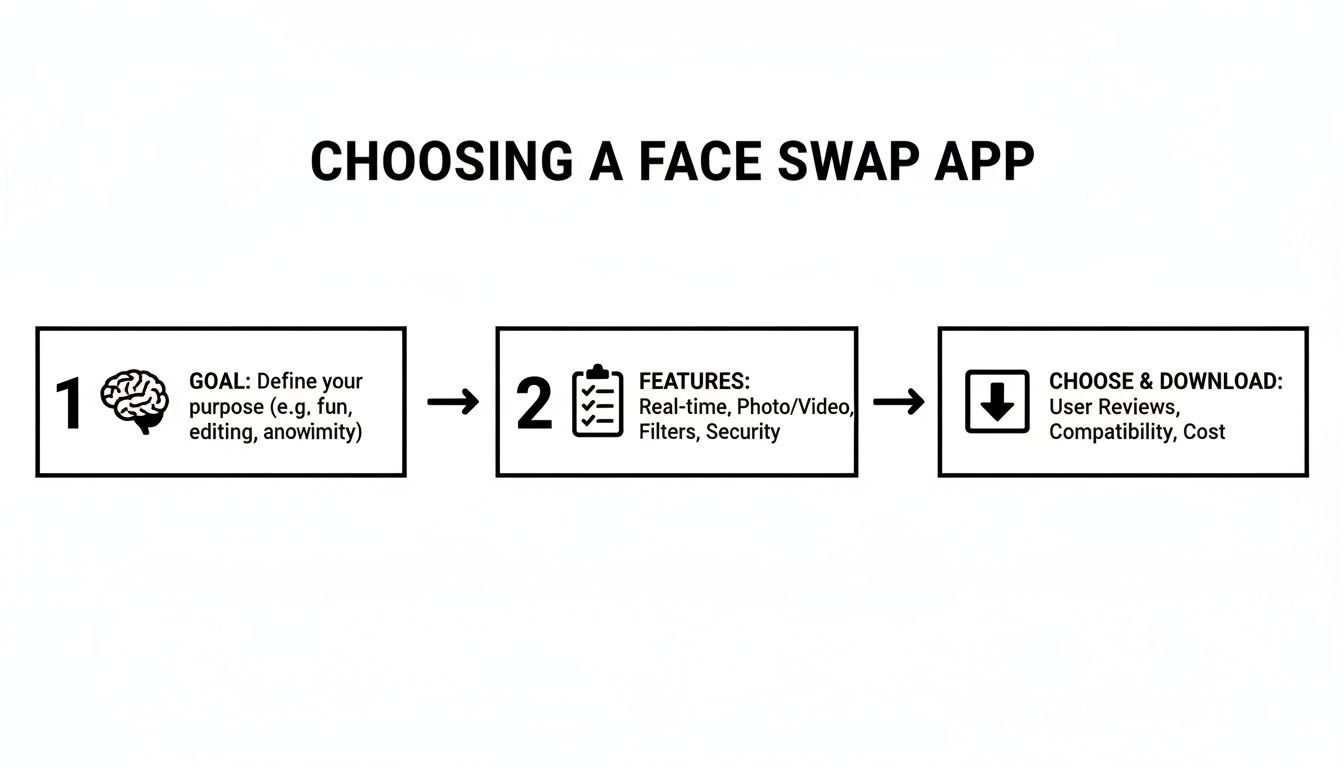
As the visual guide shows, a successful project starts with a clear goal. That goal helps you identify the features you need, which ultimately leads you to the right app for the job.
Saving and Exporting Your Work
You've got a result you love. Now it's time to save it. This is another moment where a quality app proves its worth. A top-tier face swap for iPhone app will always give you high-resolution export options.
Don't skimp here—always choose the highest quality setting available. This keeps your image looking crisp and detailed, whether you're posting it to social media or actually printing it. Saving in low resolution can create pixelation and blurriness, basically undoing all the careful work you just put in.
Follow this workflow—focus on great photo selection, let the AI do the heavy lifting, and apply those final, subtle tweaks—and you’ll be creating impressive face swaps from your iPhone in no time.
Advanced Techniques for Photorealistic Swaps
Sure, creating a decent face swap is pretty straightforward. But making one that looks genuinely real? That takes a bit more finesse. This is where you have to start thinking less like a casual user and more like a photo editor. The secret isn't just in the app's algorithm; it’s in the details that trick our eyes into believing what we're seeing.
The number one giveaway of a fake swap is almost always the lighting. It’s a dead ringer. If the light in your source photo is harsh and coming from the side, but the target image has soft, overhead light, the final image is going to feel... off. It’s that uncanny valley effect that people spot instantly, even if they can't quite put their finger on why.
So before you even think about uploading your photos, take a second to analyze them. Where are the shadows? Are they sharp and defined, or soft and subtle? Matching the quality and direction of the light is the single most important thing you can do to elevate your face swap for iPhone results.
Mastering the Art of the Match
Beyond just the lighting, a few other elements need to line up for a truly seamless blend. Getting these right from the start gives the AI the best possible chance to create something believable, minimizing those weird digital artifacts that scream "fake."
I always tell people to focus on these three things:
- Image Resolution: This one’s a deal-breaker. You can't stick a low-res, pixelated face onto a crisp, high-resolution photo and expect it to look good. It'll just look like a blurry sticker. Always start with the highest quality images you can get for both the source face and the target body.
- Facial Angles and Pose: Just like lighting, the angles have to match up. A straight-on portrait will swap beautifully onto another front-facing photo. But if you try to force that same face onto someone turned in a three-quarter profile, the features will stretch and distort, breaking the illusion immediately.
- Skin Tone and Texture: Modern AI does a surprisingly good job blending skin tones, but you can help it out. Starting with subjects who have similar complexions and skin textures (like smooth vs. wrinkled) makes the AI's job much easier. The less work it has to do to bridge the gap, the more natural the final result will be.
Post-Swap Polishing in Other Apps
Your face swap app will get you 95% of the way there, but that last 5% is where the real magic happens. I almost never stop at the initial generation. Taking the swapped image into another photo editing app on your iPhone for final touches is a pro-level move.
Think of it this way: the AI does the heavy lifting, and you provide the finishing touch. A few simple tweaks can make all the difference.
Your iPhone's built-in Photos app is actually pretty capable for this. Jump into the editing tools and play with the brightness, contrast, and warmth. Sometimes, just a tiny adjustment to the color temperature is all it takes to help the new face "settle in" to the scene.
For those who want more granular control, an app like Snapseed or Adobe Lightroom Mobile is the way to go. You can use a healing brush to smooth out any tiny imperfections along the jawline or a selective color tool to perfectly dial in the skin tones. It’s this extra step that turns a good swap into an undetectable one. If you’re ever hunting for more ideas on creative AI workflows, you can find a ton of examples in our guides for AI content creation.
By really focusing on these techniques—matching your source images meticulously and adding a touch of post-production polish—you can create swaps that are more than just a quick gimmick. You can make photorealistic images that are genuinely convincing, all from your iPhone.
Mastering Video Face Swaps on Your iPhone
Moving from a still photo to a live-action video is where the real fun with face swaps begins. It’s also where things get tricky. In a video, a face is constantly in motion—talking, laughing, turning—which means the AI has a much tougher job keeping up with all the new angles, expressions, and lighting changes from one second to the next.
The biggest challenge is maintaining consistency frame by frame. Just one weird glitch or an awkward transition can completely shatter the illusion. This is precisely why most simple photo-swapping apps just can't handle video well. Fortunately, the newest generation of iPhone apps is built specifically to tackle this complexity.
These advanced tools do a lot more than just stick a new face onto a video clip. They actually analyze the motion data of the original performance. They map the new face onto the target's head so that it moves, tilts, and even reacts in perfect sync. This seamless tracking is what makes the final result look believable, not like a cheap digital mask floating on screen.
What to Look For in a Video Face Swap App
When you’re ready to get serious about creating video content, you need an app that’s actually designed for it. The processing power required is way higher than for a simple image, so the AI has to be solid.
One of the most important features to look for is expression transfer. The best apps can actually capture the subtle details of the original performance—a slight smile, a surprised look, a raised eyebrow—and apply them to the swapped face. This is what brings the character to life and makes the clip feel authentic.
Another make-or-break element is motion tracking stability. You need the AI to lock the new face onto the person's head without any jittering or slipping, even when they're moving around. That stability is really what separates a professional-looking clip from something that just looks amateur.
It's no surprise that specialized video swap apps are taking off. Content with real-time video just gets so much more engagement than static photos, which is why creators on TikTok and Instagram Reels love them.
Get Creative and Make Something Awesome
Once you find the right tool, the creative doors swing wide open. You can do so much more than just quick gags; you can produce genuinely compelling content.
Here are a few ideas people are running with:
- Go Viral on Social Media: Drop a celebrity's face into a trending meme or create a hilarious "what if" scene from a popular movie.
- Create Custom GIFs: Make your own reaction GIFs for your group chats by putting your friends' faces into those classic, instantly recognizable memes.
- Film Your Own Skits: Write and produce short, funny videos where you play every single character. It's a fantastic way to create something unique for your followers.
If you really want to take your projects to the next level, it helps to understand a few video editing basics. Learning how to edit YouTube videos can give you some great ideas about workflow and storytelling. And as you get more comfortable, you can always find more advanced tips over on the CreateInfluencers blog.
The tech is moving fast. Take an app like FaceAi: Face Swap Any Video, which hit the scene in early 2024. It shot up the global app charts because its AI allows users to drop any face into a video with stunning realism. With thousands of users jumping on board, its success proves that the iPhone is becoming a powerhouse for high-quality video creation. You can even check out its performance stats on App Store analytics.
Got Questions About Face Swapping? Let's Clear Things Up.
Jumping into face swapping on your iPhone is a lot of fun, but it's totally normal to have questions pop up. You might wonder about quality issues or even the rules of this new creative sandbox. Getting straight answers helps you create without hesitation.
Let's tackle some of the most common things people ask when they start using a face swap for iPhone app. We'll get into everything from the fuzzy legal lines to the nitty-gritty technical reasons your swap might look a little off.
Is It Actually Legal to Make Face Swaps on My iPhone?
This is the big one, and the short answer is: it really depends on what you do with the final image.
For the most part, if you're just making something for your own amusement—like putting your face on a superhero poster or swapping a friend's face onto a meme for your private group chat—you're in the clear. That kind of personal, non-commercial use or parody is generally fine.
But things get complicated fast when you start using swaps for other purposes. Using someone's likeness without their permission to sell something, damage their reputation, or create intentionally misleading content (what people often call "deepfakes") can get you into serious legal trouble. It all comes down to your intent and the impact of your creation.
To keep things above board, just follow a few common-sense rules:
- Get Consent: The absolute safest route is to only use photos of yourself or people who have given you an enthusiastic "yes!"
- Don't Impersonate: Never create a swap that falsely shows someone saying or doing something they didn't. This is especially true if it could harm their reputation.
- Avoid Commercial Use: Thinking of using a celebrity's face to promote your brand? Don't, unless you have the proper (and likely very expensive) licensing.
Why Does My Face Swap Look Blurry or Low-Quality?
It's a classic problem. You spend time lining up the perfect swap, and the result comes out looking like a pixelated mess. Nine times out of ten, the problem isn't the app—it's the pictures you gave it to work with. The AI is only as good as the ingredients you provide.
A blurry result almost always boils down to one of two things:
- Low-Resolution Photos: You started with a small, grainy picture for either the source face or the main image. Garbage in, garbage out.
- Mismatched Angles: The faces in your photos are pointed in completely different directions. The AI has to stretch and warp the face to make it fit, which never looks good.
For a crisp, clean result, you have to start with high-resolution, well-lit photos. Make sure the faces are in sharp focus, nothing is blocking them (like hands or shadows), and they are pointed in roughly the same direction. Giving the AI clean data is the secret to getting a great result.
What Are the Privacy Risks with Face Swap Apps?
When you upload a photo to any app, you're placing trust in the company behind it. This is a big deal, especially with something as personal as your facial data. The main risk is simply not knowing how your images are being stored, used, or protected from a breach.
Before you give an app access to your camera roll, do yourself a favor and skim its privacy policy. You're looking for clear, simple language explaining if your images are saved on their servers, if they sell your data to advertisers, and what security they have in place. Sticking with well-known apps that are transparent about their practices is always the smartest move.
Can I Do Real-Time Face Swaps on My iPhone?
You sure can! Many of the most popular apps today let you see the swap happen live through your iPhone's camera. It's the same tech that powers all those wild filters on Snapchat and Instagram, and it's perfect for making fun video stories or just goofing around on a video call.
Dedicated face swap for iPhone apps are also building this feature right in for both photos and videos. How smooth it runs often depends on how powerful your iPhone is, but it's become a standard feature for anyone looking for that instant creative kick.
Ready to create stunning, high-quality swaps without the guesswork? CreateInfluencers gives you the AI-powered tools to produce photorealistic images and videos in minutes. Transform your ideas into reality with just a few clicks. Start creating for free today at CreateInfluencers.com