
Create
Make UGC video ads
Pick a creator, put your product in their hands, and get a talking video ad in a few minutes.
3 min read
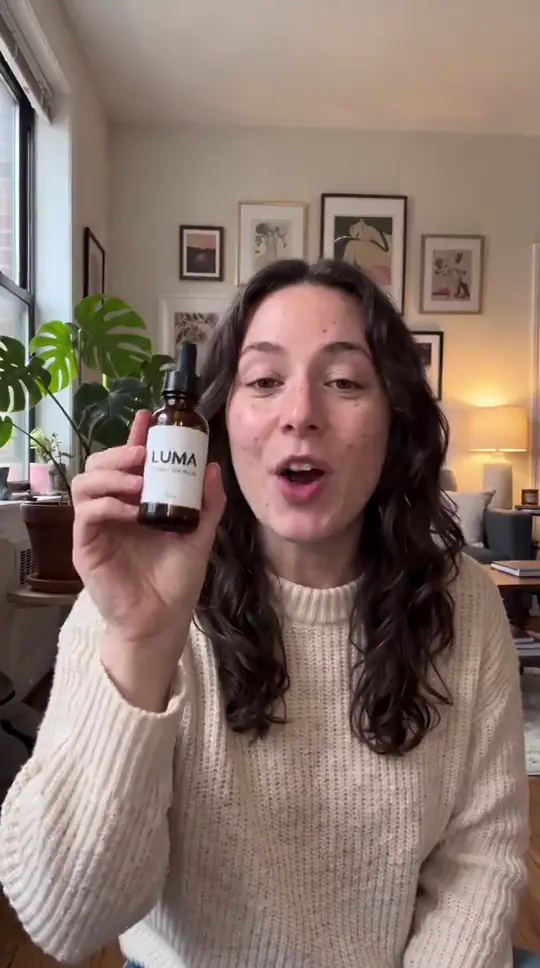
UGC ads look like a real creator talking about your product on their phone. Open "UGC ads" in the menu.
- 1
Pick your creator
Choose from "Creators", from "My creators", or tap "Create your own" to make a new one.
- 2
Add your product (optional)
Upload a photo of your product, choose how they hold it ("Holding it up", "In their hand" or "Using it") and tap "Put it in <name>'s hand" (1.5 credits). Not happy? Tap "Try again".
- 3
Script and voice
Add the product name and a few details, pick a length (10, 15, 20 or 30 seconds) and tap "Write it for me" for a ready script. Edit it as you like; tags like [excited] or [laughs] change how it's spoken. Then pick a voice.
- 4
Make my video
The cost shows before you start: about 2 credits per second of speech. Your video is ready in a few minutes and listed under "Recent videos".