A Guide to Managing Multiple Social Media Accounts
Struggling with managing multiple social media accounts? Learn how to streamline your workflow, create a scalable content plan, and use the right tools.

Trying to manage a dozen different social media accounts feels like spinning plates. You're constantly hopping between tabs, apps, and platforms, and the whole process is just… chaotic. It’s a huge challenge for businesses today, especially when your audience is scattered across an average of six to seven different social networks.
This guide will give you a practical way to turn that chaos into a well-oiled machine.
Why Managing Social Media Is So Complex Today
Let's move past the generic "post consistently" advice. The truth is, every social media platform is its own little world. Each has its own algorithm, its own audience expectations, and its own rules for what kind of content thrives. A video that goes viral on TikTok might get zero traction on LinkedIn, and a long-form post that resonates on Facebook will get completely ignored on X (formerly Twitter).
This forces you to be a master of many different languages, tailoring your message for each network. It’s a massive drain on your time and energy. Without a solid system, you're not just wasting hours; you're risking an inconsistent brand image and setting yourself up for serious burnout. The real goal isn't just to be everywhere, but to show up with a unified presence that feels cohesive and intentional, no matter how someone discovers you.
The Pillars of Effective Management
To really get a handle on this, we need to focus on four core pillars. These are the building blocks for an efficient, scalable, and genuinely impactful social media strategy. This is about more than just scheduling posts; it's about creating a sustainable workflow that actually gets you results.
Here’s what that strong foundation looks like:
- A Unified Brand Voice: This is how you make sure your brand sounds like your brand everywhere, even while adapting the tone slightly for each platform.
- A Scalable Content Engine: Forget making brand-new content for every single post. The secret is learning how to repurpose and recycle your core assets intelligently.
- Smart Automation: Let technology do the heavy lifting. Automation should handle the boring, repetitive tasks so you can focus on high-level strategy and actually talking to your community.
- Data-Backed Decisions: You need to know what's working and what's a waste of time. We’ll look at how to use analytics to fine-tune your approach continuously.
Stop thinking of your social profiles as separate islands. The most successful brands treat them like an interconnected ecosystem where each platform plays a role and supports the others to drive real business goals.
When you adopt this mindset, your social media efforts shift from a list of chores to a powerful marketing engine. For example, brands that need a constant stream of fresh, unique visuals can find creative ways to generate them. You can even learn how to create AI influencers to represent your brand in these digital spaces, giving you another powerful tool for your content strategy.
This guide will walk you through building that exact system, step by step.
Building Your Social Media Command Center
Trying to manage a bunch of social media profiles can feel like you're just putting out fires all day. To get ahead, you need to move from reactive chaos to a proactive, organized system. That starts with building a solid foundation—your social media command center. Think of it less as a physical place and more as a combination of smart strategy and the right tech.
Before you even think about scheduling a post, you have to get a clear picture of where you stand. It's time for a practical, no-fluff audit of all your social profiles. Take an honest look at each one. What's actually getting traction? Where are you hearing crickets? This isn't just about vanity metrics like follower counts; you need to know which platforms are actually helping you hit your business goals.
Define Your Strategic Blueprint
Once your audit gives you a baseline, you can start building your master strategy document. This is your North Star. It’s what keeps your entire team on the same page and ensures every single piece of content you create has a real purpose. It doesn't have to be a 50-page novel, but it does need to be clear.
For each social platform you manage, your blueprint should nail down a few key things:
- Specific Goals: "Increase engagement" is too vague. Get specific. Are you trying to drive 500 website clicks a month from your LinkedIn posts? Or maybe you want to boost brand mentions on X by 15% this quarter?
- Audience Segments: You're not talking to the same person on every network. The audience on Instagram is probably younger and more visual, while your Facebook community might be older and appreciate more detailed, value-packed posts. Map out these personas.
- Key Performance Indicators (KPIs): Pick just a few crucial metrics for each platform that directly tie back to your goals. This could be anything from reach and click-through rate to the conversion rate on a specific offer.
Having this strategy written down creates a single source of truth for your team. It's what stops inconsistent messaging in its tracks and makes sure everyone is pulling in the same direction, no matter which profile they're focused on.
This initial planning phase is what separates posting with a purpose from just posting for the sake of it. It gives you the clarity you need to make smart decisions down the line, especially when it comes to picking the right tools for the job.
Choosing Your Social Media Management Tool
With your strategy locked in, you can finally start looking at the tech that will bring it to life. A social media management tool is the heart of your command center. It’s what pulls all your scheduling, engagement, and analytics into a single, manageable dashboard. Without one, you’re just wasting time bouncing between a dozen different browser tabs.
Just look at how an all-in-one platform can give you a bird's-eye view of everything happening across your channels.
This kind of unified interface is a massive time-saver. Instead of logging in and out of each platform individually, you see your entire social media world at a glance.
The market is flooded with options, from free schedulers perfect for solopreneurs to powerful enterprise solutions. The right tool for you really boils down to your budget, team size, and what your biggest headaches are. For example, if your community managers are overwhelmed, a unified inbox that pulls all DMs and comments into one place is a non-negotiable. If you're working with a team, you'll need a tool with a collaborative content calendar.
It's also worth noting that this space is getting smarter. As of 2025, more than three-quarters of senior social strategists said they're using AI to help with planning. Teams using AI for things like analytics and scheduling aren't just more efficient; they also adapt their strategies more quickly, which is a huge advantage. You can dig into more of these trends and other findings over on Hootsuite's research page.
To help you get started, let's break down what different types of tools offer.
Choosing Your Social Media Management Tool
Finding the right platform can feel overwhelming, but it's really about matching features to your specific needs. This table compares the typical capabilities you'll find at different levels, from basic free tools to comprehensive enterprise systems.
| Feature | Free / Freemium Tools (e.g., Buffer Free) | All-in-One Platforms (e.g., Hootsuite, Sprout Social) | Enterprise Solutions (e.g., Sprinklr) |
|---|---|---|---|
| Scheduling & Posting | Basic scheduling for a limited number of accounts. | Advanced scheduling with optimal timing suggestions. | Full-scale campaign management and automation. |
| Unified Inbox | Not typically included. | Manages DMs, comments, and mentions in one feed. | Comprehensive customer service and support features. |
| Analytics & Reporting | Limited, surface-level metrics. | Detailed performance reports and competitor analysis. | Deep, customizable analytics with business intelligence. |
| Team Collaboration | Single-user focused. | Multiple user seats with approval workflows. | Advanced user permissions and global team features. |
Ultimately, a good tool should feel like an extension of your team—something that automates the tedious work so you can focus on strategy and creativity.
By pairing a well-documented strategy with the right tech, you build a command center that doesn't just get you organized; it empowers you to manage multiple social profiles with confidence and real impact. This foundation makes everything that comes next—from creating content to analyzing performance—so much easier.
Building a Content Workflow That Actually Works
Once you've got your command center set up, it's time to tackle the content itself. Let’s be real: trying to manage multiple social media accounts by creating posts on the fly every single day is a fast track to burnout. The secret isn't more hustle; it's a smarter, repeatable system for producing and distributing great content.
This is where a solid workflow becomes your best friend, turning a daily scramble into a calm, strategic operation.
The Magic of Content Batching
One of the biggest game-changers for saving time and sanity is content batching. Stop thinking day-to-day. Instead of trying to find an idea, write a caption, and create a visual every single morning, you dedicate specific blocks of time to one type of task.
For example, I'll often spend a Monday morning just brainstorming a month's worth of post ideas. Then, Tuesday afternoon might be dedicated to shooting all the video clips I need for the next two weeks. This approach is powerful because it lets your brain stay in one "mode," which drastically cuts down on the mental drag of switching gears all the time.
- The Planning Block: Set aside a few hours to map out all your posts for the next week or even the whole month.
- The Creation Block: Use a completely separate chunk of time to write captions, design graphics, or film videos.
- The Scheduling Block: Finally, take all that finished content and load it into your scheduling tool to go live automatically.
When you group similar tasks, you essentially create an assembly line for your content. Your output gets faster, and honestly, the quality usually goes up, too.
Get More Mileage From Your Best Ideas by Repurposing
Here's the trick to staying consistently active across multiple platforms without working 24/7: content repurposing. You don't need ten brand-new ideas every single week. What you really need is one great core idea that you can intelligently adapt for each network.
A single piece of "pillar" content—like a detailed blog post or a long-form YouTube video—can be sliced and diced into dozens of smaller pieces. This way, your main message gets in front of your audience in the format they actually prefer on the platform they're already using.
Think of it this way: A single podcast interview can become the full audio episode, a series of quote graphics for Instagram, a short video clip for TikTok, and a thoughtful summary for a LinkedIn article. You’re not just copy-pasting; you’re translating the value for different audiences.
Let's walk through a quick example. Imagine you're a fitness coach and you just published a blog post called "The Top 5 Myths About Strength Training."
Here’s how you could spin that one piece of content:
- Instagram: Make a five-part Carousel post, with each slide tackling one myth with a bold graphic and a quick caption. You could also film a 30-second Reel debunking the most common myth.
- LinkedIn: Write a more professional, text-focused post on how these myths impact the business side of personal training, sparking a discussion among other pros.
- X (formerly Twitter): Kick off a thread where each tweet debunks one myth, using emojis and questions to get people talking.
- Facebook: Share a slightly longer text post with a strong image, asking your followers which myth they used to believe.
This infographic breaks down the essential first steps—auditing your platforms, setting a clear strategy, and picking your tools—which are the foundation for a great content workflow.
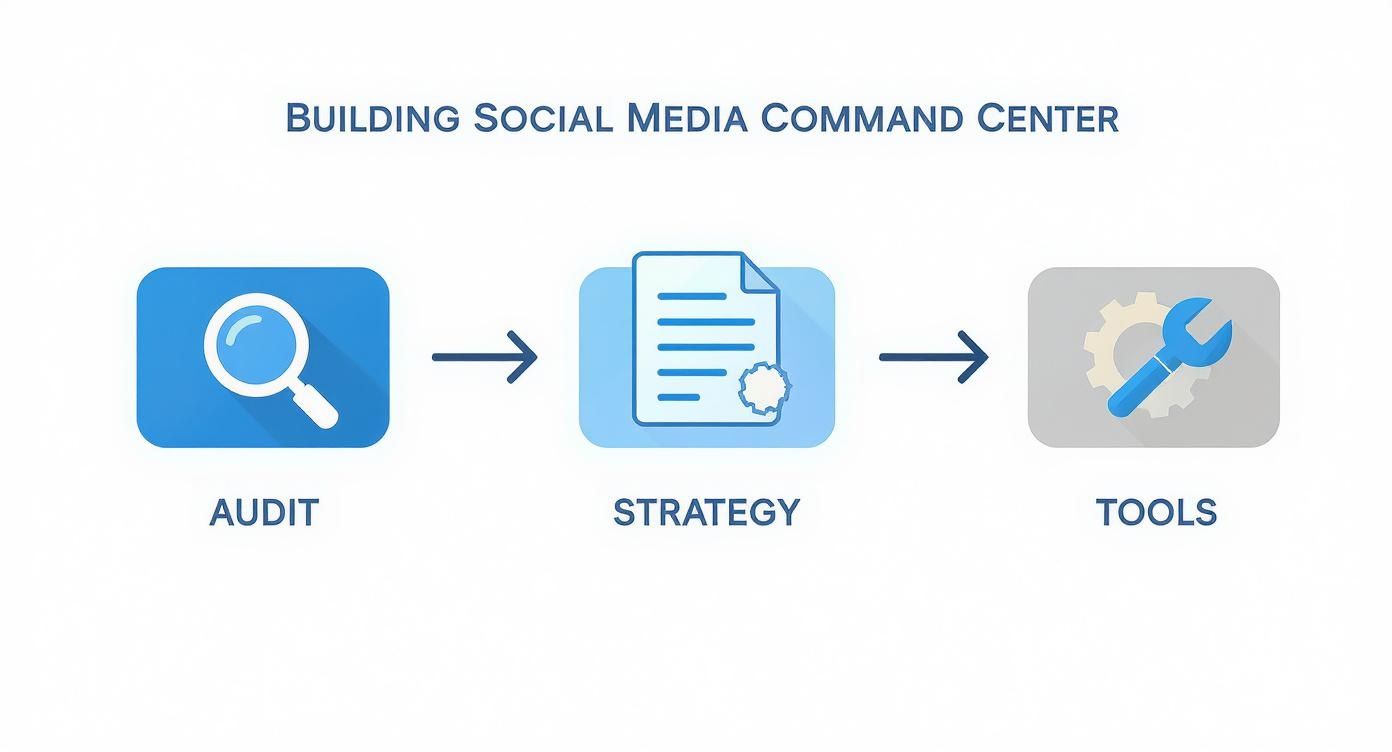
As you can see, a structured approach is key. Starting with an audit and a solid strategy makes choosing the right tools to execute your content plan a whole lot easier.
Your Master Content Calendar: The Final Piece
The last piece of the puzzle is your master content calendar. This is more than just a place to scribble down ideas; it's your high-level command center. It shows you exactly what's being published, where, and when, making sure you have a balanced mix of content going out across all your channels.
I've found tools like Asana, Trello, or even a souped-up spreadsheet in Airtable work perfectly for this.
Your calendar should track a few key things for every single post:
- Platform: Which network is this for?
- Content Pillar: Which of your core topics does this support?
- Format: Is it a video, image, text post, etc.?
- Status: Is this an "idea," "in progress," or "scheduled"?
- Publish Date: When is it set to go live?
Seeing everything laid out visually helps you spot content gaps and stops you from accidentally posting about the same thing on every channel on the same day. If you're looking to really level up your planning, our collection of social media guides for influencers has some advanced frameworks you can borrow. Trust me, this level of organization is what separates the pros from the amateurs.
Mastering Cross-Platform Engagement
Putting out a steady stream of content is a great start, but it’s really only half the battle. If you want true growth—the kind that builds a loyal community and actually drives business—you need to have real, two-way conversations with your audience. When you’re managing multiple social media accounts, the flood of notifications, direct messages, and comments can become a tidal wave in no time.
The secret isn’t to work harder; it's to centralize everything. Instead of frantically bouncing between five different apps just to check your inboxes, you need a system that brings every single interaction into one place. This is where a unified social inbox, a lifesaver feature in most management tools, really shines.
Unify Your Inboxes to Conquer the Chaos
A unified inbox is exactly what it sounds like: it pulls all your private messages, public comments, and brand mentions from networks like Facebook, Instagram, and LinkedIn into a single, manageable feed. Moving from a scattered, reactive approach to a centralized, proactive one is a massive game-changer for anyone handling community management.
Just imagine being able to see a comment on your latest Instagram Reel right next to a DM from a potential client on LinkedIn. This consolidated view ensures no interaction falls through the cracks and dramatically slashes the time you spend just checking for new messages.
By consolidating your communication channels, you’re not just saving time. You’re creating a more cohesive and responsive customer experience, which is what builds brand loyalty and trust.
Setting this up allows you to handle interactions far more efficiently. Many tools even let you assign conversations to team members, tag messages for follow-up, and see a user’s entire interaction history across platforms. That context is gold for having a meaningful conversation.
The Smart Way to Use Response Templates
Once your inbox is organized, the next step is to streamline your responses. Let’s be honest, a lot of the questions you get are probably repetitive—inquiries about business hours, shipping policies, or service details. Creating a library of pre-written response templates can easily save you hundreds of hours over a year.
But there’s a catch. The key is to use templates as a starting point, not a crutch. Purely robotic, copy-pasted replies feel cold and impersonal, and they can do real damage to your brand’s reputation.
- For common questions: Start with a template that gives the core information clearly and concisely.
- Add a personal touch: Always customize the template. Use the person’s name and reference a specific detail from their original message.
- Know when to go custom: For complex issues, negative feedback, or even really unique compliments, a fully personalized, thoughtful response is non-negotiable.
This balanced approach gives you efficiency without sacrificing the human connection that makes social media so powerful in the first place. As you're honing your brand's unique voice, you can find a ton of great tips and inspiration on the CreateInfluencers blog, which is a great resource for creators.
From Reactive Replies to Proactive Conversations
Great engagement isn't just about answering people who message you directly. It’s also about actively seeking out and joining relevant conversations happening all over the internet. This is where social listening comes in. By setting up alerts in your management tool, you can monitor things like:
- Your brand name (and its common misspellings): This helps you find conversations you’d have otherwise missed completely.
- Competitor names: See what people are saying about them—the good, the bad, and the ugly.
- Industry keywords and hashtags: Pinpoint trends and jump into discussions where you can offer genuine value.
This proactive strategy positions you as a helpful, knowledgeable resource in your field, not just another brand shouting into the void.
Finally, to make sure this all actually happens, schedule dedicated "engagement blocks" into your calendar. It doesn't have to be a huge time commitment; just 15-20 minutes, twice a day, can be enough to clear your unified inbox and participate in a few key conversations. This disciplined routine keeps your community buzzing and also satisfies platform algorithms, which love to see accounts that foster active discussions.
Analyzing Performance Across Your Social Ecosystem
Posting content and engaging with your audience is only half the battle. If you're not measuring your efforts, you’re basically flying blind. The real key to successfully managing multiple social media accounts is knowing what’s working, what isn't, and why. It’s about moving past vanity metrics like follower counts and digging into the data that actually impacts your bottom line.
Without a solid, data-backed approach, you're just guessing. You could be spending hours creating TikToks when your best leads are quietly coming from a steady presence on LinkedIn. Analyzing your performance across all channels gives you the clarity to make smarter decisions and put your time and money where it counts.
Setting Platform-Specific KPIs
First things first, you need to define what success even looks like for each platform you're on. A key performance indicator (KPI) for Instagram will—and should—be totally different from one on LinkedIn. The user behaviors are different, and your goals for being there are different. Your KPIs have to connect directly back to the unique purpose you've set for each network.
Let's look at a few real-world examples:
- LinkedIn: If you're there for lead generation, you're probably tracking website clicks from your posts, the conversion rates on landing pages you link to, and the number of qualified DMs you’re getting.
- Instagram: For brand awareness, you’ll be focused on metrics like post reach, Story views, how often your content is shared, and the number of profile visits.
- Facebook: If community building is the goal, you’ll want to watch your comment rates, engagement on group posts, and event RSVPs. Digging deep into community health is critical, and there are even specialized Facebook Group analytics tools that can help.
Don't fall into the trap of using a one-size-fits-all report. A consolidated dashboard is great for a high-level view, but true insight comes from digging into the unique metrics that define success on each channel.
This platform-specific focus helps you answer the important questions. Is your TikTok strategy actually driving top-of-funnel awareness, even if it’s not converting directly? Is LinkedIn truly the powerhouse for B2B leads you think it is? The data will tell you.
Using Consolidated Reports for a Holistic View
While drilling down into platform-specific KPIs is crucial, you also need to see the big picture. Most social media management tools have great analytics features that can pull everything into consolidated reports, letting you compare performance across all your channels side-by-side. This is where you connect the dots.
These reports help you spot the broader trends you'd miss if you were just looking at one platform at a time. You might see that certain content formats—like short-form video—are killing it everywhere, justifying a bigger budget for video production. Or you might find that a message that resonates on Twitter falls completely flat on Facebook.
The scale of this is staggering in 2025. There are 5.17 billion people—that’s over 65% of everyone on Earth—on social media. Their attention is scattered everywhere. The typical user is active on nearly seven different platforms a month, spending over two hours a day hopping between apps like TikTok (55 minutes), YouTube (50+ minutes), and Instagram (38 minutes). This fragmentation makes cross-platform tracking an absolute must for any modern marketing strategy.
Ultimately, this data-driven approach shifts your social media management from guesswork to a precise, results-focused operation. It gives you the confidence to double down on what’s working, pivot away from what isn't, and constantly fine-tune your efforts for the biggest possible impact.
Got Questions About Juggling Social Accounts? We've Got Answers.
Even with the best game plan, managing multiple social media profiles will throw some curveballs your way. How do you keep your brand's personality straight across five different platforms? What's the secret to not spending your entire day just logging in and out of apps?
These are the real-world questions that come up all the time. Let's walk through some of the most common ones and get you some clear, practical answers so you can manage your accounts with confidence.
How Do I Keep My Brand Voice Consistent?
A consistent voice isn't about copy-pasting the same message everywhere. It's about having a consistent brand personality. The first step is to nail down your core attributes in a simple voice guide. Are you clever and funny? Or are you more of a trusted, authoritative guide?
Once you know who you are, you can adapt your tone to fit the room. It’s like how you talk to your boss versus how you talk to your best friend—you're still you, just a slightly different version.
- LinkedIn: This is your professional space. Share industry insights and focus on adding real value to your network.
- Instagram: Get more visual and casual. Think inspiration, behind-the-scenes moments, and a more personal connection.
- X (formerly Twitter): Here, it’s all about being quick, timely, and conversational. Jump into trends and chats.
Your core personality ties everything together, but the way you express it feels right for each platform. This is what keeps you from sounding like a generic ad that just got dropped into the wrong place.
The goal is for someone to recognize your brand by its personality, not just your logo. That consistency builds a sense of familiarity and trust, no matter where they find you.
What Are the Biggest Time-Saving Hacks?
When you’re juggling a bunch of accounts, efficiency is everything. Sure, a good management tool is a huge help, but the real time-savers come from your workflow. From my experience, three things make the biggest difference.
These aren't complicated secrets; they're just smarter ways of working.
- Batch Your Content. This one is non-negotiable. Set aside a block of time—maybe one day a week—to create all your content for the upcoming week or even month. It saves a staggering amount of time compared to the daily scramble to find something to post.
- Use a Social Media Scheduler. A scheduler is what makes batching possible. Tools like Buffer or Hootsuite let you load up all that content you just created and set it to publish automatically at the best times for each network.
- Get a Unified Inbox. This is a lifesaver. A tool that pulls all your DMs, comments, and mentions into one single feed means you stop bouncing between apps all day. Nothing important gets missed, and your response time gets way faster.
Should I Post the Same Thing Everywhere or Create Unique Posts?
You should never post the exact same content everywhere. It’s one of the most common mistakes I see brands make. The better approach is to repurpose your core idea for each platform, tweaking it to fit the format and what users there expect to see.
Think of it this way: one great piece of content, like a 10-minute YouTube video, can fuel your entire social calendar for a week.
- Pull a 60-second highlight reel for your Instagram audience.
- Turn the key takeaways into a text-based thread for X.
- Write a more polished, professional article based on the video for LinkedIn.
Just uploading the raw video file to all three platforms won't work. The engagement will be terrible because it ignores why people are on that specific app. Always adjust the caption, hashtags, and the visual itself to make the content feel like it truly belongs there. If you're looking for more strategies, you can find tons of valuable resources on the v30.ai blog for social media insights.
How Often Should I Be Posting?
There isn't a magic number that works for every single brand, but there are some solid best practices you can use as a starting point. From there, you'll need to watch your analytics and adjust. Just remember, consistency matters more than frequency.
If you have a good content system in place, this is a reasonable starting point:
| Platform | Recommended Frequency |
|---|---|
| X (Twitter) | 3-5 times per day |
| 1-2 times per day | |
| Instagram Feed | 3-5 times per week |
| 3-5 times per week |
It's far better to post high-quality, engaging content 3 times a week, every single week, than it is to post five times a day for a few days and then disappear for a month. Start with a schedule you know you can stick to, then let your performance data tell you where it’s worth ramping things up.
Ready to bring your own unique digital personalities to life? With CreateInfluencers, you can generate custom AI influencers, create stunning visuals, and craft dynamic videos in minutes. Whether for marketing, branding, or personal projects, our AI-powered tools give you the power to create standout content effortlessly. Start creating for free at https://createinfluencers.com.