Finding the Best Face Swap App for iPhone
Discover the best face swap app for iPhone. Our guide explores top features, security risks, and how to create amazing AI-powered photo and video swaps.
A great face swap app for iPhone is more than just a gimmick. It uses some seriously powerful AI to realistically map your face onto another photo or video, letting you create anything from a quick, funny meme to a surprisingly convincing video clip. These apps have come a long way from the clunky filters of a few years ago, now packing advanced features for both fun and professional content.
How AI Face Swap Apps Are Changing Content Creation
What started as a fun little novelty has quickly become a major player in digital media. A modern face swap app for your iPhone doesn't just crudely cut and paste your head onto something else. It actually analyzes facial structures, matches the lighting, and even mimics expressions to generate a brand-new, believable image or video. This tech is basically your entry ticket into the wild world of AI-generated content.
Think of the app as a digital sketch artist. It looks at the "source" face (that's you) and the "target" image—maybe a celebrity, a character in a movie scene, or just a friend—and then skillfully redraws your features onto the new canvas. The best part is how easy it's become, effectively turning your phone into a pocket-sized special effects studio.
The Rise of AI-Powered Visuals
The appeal is obvious, and it’s fueling a market that's absolutely exploding. The global face swap app market was valued at US$713 million not too long ago and is on track to hit US$1895 million by 2031. That’s a compound annual growth rate of 15.2%, which shows just how much people want these kinds of creative AI tools on their phones.
This technology is a fantastic, everyday example of how AI is opening up totally new ways to create content. To really get the full picture, it helps to understand the ideas behind synthetic media. You start to see how these fun little apps are actually part of a much bigger shift in how we make things online.
At their core, these apps are leveling the playing field. They give regular users the power to produce visuals that once required a team of experts and expensive software, opening up new possibilities for personal expression and even marketing.
The applications are endless, from viral TikToks to hyper-personalized ad campaigns. More advanced platforms like CreateInfluencers are pushing things even further, moving beyond simple swaps to offer the tools for full-blown AI character generation with far more control and quality.
What Makes a Great iPhone Face Swap App?
Not all face swap apps are built the same. Far from it. When you’re scrolling through the App Store, you’ll find everything from one-trick ponies designed for a quick laugh to powerful creative suites. Knowing what to look for is key to picking the right tool for the job.
Think of it like choosing a camera. Do you need a simple point-and-shoot for a party, or a professional DSLR for a photoshoot? Both take pictures, but the quality, control, and what you can do with them are worlds apart. It's the exact same story with a modern face swap app for iPhone—the right features change everything.
Getting the Basics Right: Quality and Realism
Before you even think about fancy features, an app has to nail the fundamentals. If the final image looks like a sloppy cut-and-paste job, even the cleverest idea will fall flat.
These are the non-negotiables for a believable swap:
- High-Resolution Output: The swap needs to be sharp and clear. A blurry, pixelated result instantly screams "fake" and is pretty much useless for anything other than a quick, disposable joke.
- AI-Powered Blending: This is the secret sauce. Good AI analyzes skin tones, lighting, and textures in both images to create a natural-looking blend. It shouldn't just stick one face on another; it should merge them seamlessly.
- Accurate Face Detection: The app has to find the key facial landmarks—eyes, nose, mouth—with precision. If it gets this wrong, you end up with distorted, misaligned features that look bizarre, and not in a good way.
A truly great face swap app doesn’t just overlay one face on another. It intelligently synthesizes an entirely new, coherent image that respects the original lighting and perspective. The goal is a result that’s not just technically impressive, but visually convincing.
This commitment to quality is why apps like Reface became so popular, pulling in over 100,000 monthly downloads in the US alone. Their success is built on a simple promise: it just works. The market data backs this up, too. Photo-based swaps still hold a 55% market share, but video features are catching up fast, as highlighted in this detailed face swap app market report.
Beyond the Basics: Advanced Features for Creative Freedom
Once an app has the fundamentals down, the advanced features are what unlock true creative control. These are the tools that separate a simple novelty app from a platform you can use to create genuinely impressive content.
Look for these more powerful capabilities:
- Multi-Face and Group Swaps: Swapping one face is fun, but swapping everyone in a group photo? That opens up a whole new world of creative (and hilarious) possibilities.
- Video Face Swapping: This is where the technology really comes to life. The best apps can track a face in motion and apply the swap throughout an entire video clip with stunning accuracy.
- Body Swapping: High-end platforms like CreateInfluencers take it a step further. They allow for full-body swaps, letting you place a person into a completely different outfit or scene.
- AI Upscaling and Enhancement: This feature is a game-changer for quality. It uses AI to sharpen details, clean up artifacts, and increase the final resolution, giving your creations a polished, professional finish.
Not everyone needs every feature, of course. A casual user just looking for fun has very different needs than a content creator building a brand.
Here’s a quick breakdown to help you decide what matters most to you.
Core vs Advanced Face Swap App Features on iPhone
| Feature | What It Does | Best For |
|---|---|---|
| High-Resolution Output | Generates swaps in HD to avoid pixelation. | Everyone. This is a must-have for quality. |
| AI Blending | Matches skin tones, lighting, and textures. | Everyone. Essential for believable results. |
| Video Swapping | Applies a face swap to a moving video clip. | Content Creators and users making GIFs/memes. |
| Multi-Face Swaps | Swaps several faces in one image or video. | Social Media Users and people editing group photos. |
| Body Swapping | Swaps the entire body, including outfits and setting. | Professionals and Creators needing total control. |
| AI Upscaling | Enhances the final image quality and resolution. | Professionals who need high-quality final assets. |
Ultimately, the "best" app depends entirely on your goals. For quick and easy fun, a simple app with solid core features will do the trick. But if you’re looking to create standout content, you’ll want to find a tool with the advanced capabilities to bring your vision to life.
Navigating Privacy and Security in Face Swap Apps
Let's be honest, it's the question everyone has right before they tap "Allow Access to Photos"—is it actually safe to upload your face to a face swap app for iPhone? It’s a totally fair question, and getting a handle on what happens to your data is the key to using these creative tools with total peace of mind.
When you use a face swap app, your photos have to be processed somewhere. This happens in one of two ways: either right on your device or up in the cloud. Think of on-device processing like having a private conversation in your own home—the data never leaves your iPhone. This is, by far, the most secure route.
Cloud processing is a bit different. It’s more like sending a letter through the mail. You’re trusting a third party to handle your information securely as it travels to their servers and back. While any developer worth their salt uses strong encryption, it's a path that naturally has a bit more risk. Your photos get sent off, worked on, and the final image is then sent back to you.
How to Spot a Trustworthy App
Thankfully, the Apple App Store gives you some powerful tools to vet an app’s privacy practices before you even hit download. Your best friend here is the Privacy Nutrition Label, found on every app's product page. It’s a simple, plain-English breakdown of exactly what data an app collects and why.
Here's what to look for:
- Data Linked to You: Is the app connecting your photos, facial data, or usage habits directly to your identity? The less data linked back to you, the better.
- Data Used to Track You: This one’s a major red flag. If an app wants to follow you around across other apps and websites, you have to ask yourself why a face swap tool would ever need that.
- Developer's Privacy Policy: A reputable app will have a clear privacy policy that isn't hidden. Look for specific language confirming that your photos are deleted from their servers after processing or within a short timeframe.
Here's a good rule of thumb: treat your biometric data—like your face—with the same care you'd give your credit card number. If an app is cagey about how it protects your photos, it’s probably best to find an alternative that takes your privacy seriously.
Your Privacy Checklist
Before you grant any app new permissions, just run through this quick mental checklist. It takes less than a minute and can save you a world of headaches later.
- Check the Privacy Label: What data does it actually collect?
- Read Recent Reviews: Are other users raising concerns about privacy?
- Review the Permissions: Does the app ask for access to things it clearly doesn't need, like your contacts or microphone?
At the end of the day, being proactive is your best defense. By understanding the difference between on-device and cloud processing and using the tools Apple provides, you can easily find a fantastic and secure face swap app for your iPhone. That way, you can focus on creating something amazing without a nagging worry about where your data might end up.
Creating Your First High-Quality Face Swap
Alright, let's move from theory to the fun part: making your first face swap. Getting a truly high-quality result on your iPhone isn't about being a tech wizard; it's about nailing a few key fundamentals. The process is pretty much the same across any decent face swap app for iPhone.
Think of it like cooking a great meal—the final dish is only as good as your ingredients. In this case, your "ingredients" are the source image (the face you're using) and the target image (the scene or body you're putting it on). Getting these right is the single biggest step toward creating something impressive and believable instead of a distorted, blurry mess.
Selecting the Right Photos for a Perfect Swap
If you remember one thing, make it this: lighting is everything. If your source face was shot in warm, indoor light, but the target photo is from a bright, sunny day, the AI will have a tough time making them look natural together. Always try to match the lighting conditions as closely as you can.
Here are a few more pro tips for picking your photos:
- Go for Front-Facing and Clear: The best source photos are taken straight-on, with the face looking at the camera. Make sure it's free of heavy shadows or things blocking the face, like hair or sunglasses.
- High Resolution is a Must: You have to start with sharp images. AI can't invent detail that was never there, so a blurry source photo will only ever produce a blurry swap.
- Match the Angles: Try to match the head's angle and position. If the person in the target photo has their head tilted slightly to the left, find a source photo with a similar tilt. It makes a huge difference.
This simple workflow shows how the process breaks down, from collecting your data to creating a secure profile for your swaps.
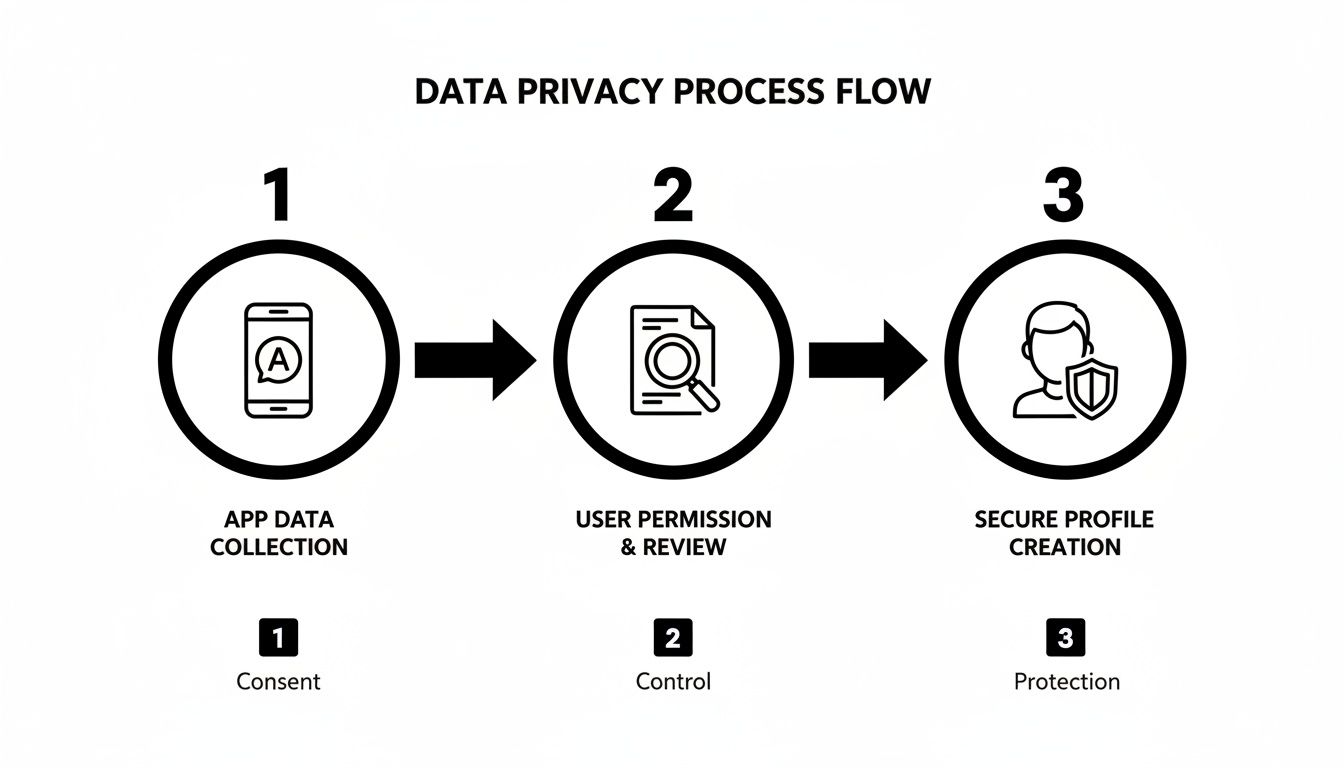
It's a good reminder that taking a moment to check your inputs will give you a much better output.
Fine-Tuning for a Believable Result
Once you’ve loaded your photos, the AI does most of the heavy lifting. But don't stop there. Most apps give you tools to fine-tune the result. You can usually resize, rotate, or just gently nudge the swapped face until it sits perfectly.
The goal isn't just to place a face; it's to make it look like it belongs there. My advice? Pay extra attention to the chin line and the eyes. If you get those two areas lined up perfectly, the result will be 90% more convincing.
Don't be afraid to play around. Sometimes, two pictures you thought would be a perfect match just don't blend right, while an unexpected pairing creates a seamless swap. Stick to these core steps, and you'll have a solid process for getting great results every time.
For more deep dives into using AI for content creation, check out the resources in our CreateInfluencers guides.
Achieving Professional Results with Advanced Workflows
While a standard face swap app for iPhone is fantastic for a quick laugh or a shareable meme, there comes a time when you need more firepower. To create something truly professional—visuals that stop people in their tracks—you have to graduate from mobile-only tools to a more sophisticated workflow. This is where dedicated desktop or cloud platforms really shine.
Think of it like this: a mobile app is your trusty point-and-shoot camera. It's fast, convenient, and great for capturing moments. But an advanced platform is the full DSLR studio setup. It gives you precise control over every last detail—the lighting, the resolution, the subtle angles—letting you craft a flawless final image that looks truly intentional.
Platforms like CreateInfluencers were built for exactly this. They go way beyond simple face swaps, offering a whole toolkit for high-end content creation, from AI upscaling and multi-face consistency to full-on body transformations.
The Professional Workflow Unpacked
Getting photorealistic results every single time isn't about luck; it's about following a deliberate process. Forget the one-tap gimmicks. A professional workflow is a strategic approach that puts quality first at every single step, ensuring your final content looks polished, not just quickly edited.
Here’s a look at how a typical advanced workflow unfolds:
- Start with High-Resolution Assets: This is the golden rule. You can't create a masterpiece from a blurry photo. Always use clear, well-lit source images—think 1024x1024 pixels at a minimum—to give the AI enough data to work its magic.
- Utilize Precision Alignment Tools: This is where the pros separate themselves. Instead of letting an app guess, advanced platforms let you manually tweak the face's position, angle, and scale. That fine-tuned control is crucial for getting the eyes, nose, and chin to line up perfectly.
- Apply AI Upscaling and Enhancement: This is the finishing touch that takes your work from good to great. A powerful AI upscaler analyzes the swapped image, intelligently adds missing detail, sharpens the edges, and cleans up any weird artifacts, pushing the final result to HD or even 4K quality.
This hunger for high-quality results is a proven market. Just look at FaceApp, a trailblazer in AI editing, which has pulled in over USD 400 million in revenue. Its Pro subscription alone is responsible for USD 135 million of that, proving that people on iOS are more than willing to pay for premium features that deliver incredible results.
Why an Advanced Platform Is a Game Changer
The biggest win when using a dedicated platform is the massive jump in quality and control. Mobile apps have to compress images to keep things fast, but that compression almost always means losing detail. Advanced workflows, on the other hand, are built from the ground up to preserve—and even add to—the original image quality.
For serious creators, influencers, and marketers, the goal isn't just to swap a face. It's to build a believable character or tell a compelling visual story. Advanced tools make this possible by providing the precision needed to suspend disbelief.
This trend toward higher-quality, polished content is everywhere you look. To make sure your own creations get the attention they deserve, it helps to see how the pros present their work. Learning about mastering iPhone app mockups for App Store growth can give you some great ideas for showcasing your face swaps in a professional light.
Ultimately, leveling up your skills means adopting the tools the pros use. By embracing a more detailed and deliberate workflow, you can move past simple swaps and start creating content that genuinely stands out. For more creative ideas and strategies, check out the CreateInfluencers blog.
Troubleshooting Common Face Swap Issues on Your iPhone
Even the best face swap app for iPhone can spit out a weird result now and then. Before you get frustrated with a distorted, blurry, or just plain strange-looking creation, know that the fix is usually surprisingly simple. Think of it as a quick tune-up, not a total breakdown.
Nine times out of ten, the problem isn't a bug in the app—it's the quality of the photos you're feeding it. Blurry images, bad lighting, and clashing angles are the usual suspects behind a disappointing swap. The AI is smart, but it needs clear, well-defined data to work its magic.
Solving Blurry or Distorted Results
The number one fix for a blurry outcome? Start with better photos. Make sure both the source face and the target image are sharp, high-resolution, and well-lit. The AI really struggles with motion blur or heavy shadows cutting across the face, so try to avoid those.
Distortion—where facial features look stretched or squashed—is another frequent headache. This almost always happens when the angles of the two faces are completely different.
Here's a simple rule of thumb: aim for eye-to-eye alignment. If the person in the target photo is looking straight ahead, use a source photo where you're also looking right at the camera. Matching the head tilt and overall perspective is the secret to getting a result that doesn't look like a funhouse mirror.
Fixing Unnatural Blending and App Performance
What if the swap just looks... off? If the skin tones don't match or the lighting seems weird, it's because the app is having a hard time blending two completely different environments. The solution is to use photos taken in similar lighting. Indoor light with indoor light, and outdoor with outdoor—it makes a huge difference.
Sometimes, though, the problem isn't your photos; it’s the app itself. If your face swap app is running slow, freezing, or crashing, here are a few quick things to try:
- Update the App: Developers are always pushing out updates to squash bugs and improve how things run. Check the App Store.
- Check Your iOS Version: Make sure your iPhone’s software is up to date. An old version of iOS can cause weird compatibility problems with newer apps.
- Clear the Cache: If the app has an option to clear its cache, doing so can free up memory and fix slowdowns.
- Restart Your iPhone: You’d be surprised how often the classic "turn it off and on again" trick solves minor glitches.
Frequently Asked Questions
Jumping into the world of AI creative tools always brings up a few questions. Let's tackle some of the most common ones so you can start using any face swap app for iPhone like a pro and get the results you're after.
Are Face Swap Apps on iPhone Safe to Use?
That’s the big question, and the answer really boils down to the app's privacy policy. The most reputable apps handle your photos in one of two ways: either they process everything right on your device (so your images never leave your phone), or they use secure, encrypted servers and get rid of your data right after the swap is done.
Your best bet is to check the App Store's privacy labels before you even hit "download." It’s a straightforward summary of what data the app collects. Stick with apps that are upfront about how they handle your stuff—it's just a smarter, safer way to go.
Can I Perform a Face Swap in a Video on My iPhone?
You absolutely can. Many of the newer apps are built specifically for video. They're fantastic for whipping up short, funny clips and GIFs for social media, letting you drop your face into a famous movie scene or a viral meme with just a few taps.
But, if you're working on something longer or need that polished, high-quality look, a dedicated desktop tool or a cloud-based platform is still your best option. Mobile apps are great for quick fun, but professional projects need more horsepower.
Why Does My Face Swap Look Unrealistic or Fake?
Nine times out of ten, a wonky-looking swap comes down to a bad source photo. The AI is only as good as the information you give it. For the best results, you need a high-resolution, well-lit photo where the person is looking straight at the camera.
Things like mismatched lighting between the two photos, weird angles, or clashing skin tones will almost always lead to a swap that just looks off. A face swap app for iPhone with a really good AI blending engine can help smooth things over, but starting with great photos is half the battle.
Ready to move beyond simple swaps and start creating truly professional AI content? With CreateInfluencers, you can design your own AI characters from scratch, generate stunning high-resolution images, and even earn money through affiliate opportunities. To learn more, check out our guide to the CreateInfluencers affiliate program.