A Creator's Guide to AI Generated NSFW Images
Explore how to create high-quality AI generated NSFW images. This guide covers everything from choosing tools and writing prompts to ethics and monetization.
So, you’re diving into the world of AI-generated NSFW content. It all starts with specialized AI models, often built on frameworks like Stable Diffusion, that are specifically designed to create adult-themed visuals. Today, you can do this using everything from downloadable software on your own PC to slick web-based services, letting you turn simple text prompts into surprisingly detailed artwork.
Exploring the World of Adult AI Image Generation
The explosion in AI-generated content has carved out a unique, and let's be honest, pretty controversial creative space. While the big names like Midjourney and DALL-E have put up heavy filters against anything adult, a whole other ecosystem has sprouted up in its place, running mostly on open-source tech. This has been a huge win for artists, hobbyists, and digital creators who want to explore themes that were once incredibly difficult to produce with this level of control.
At the core of all this are diffusion models. The best way to think about them is as digital artists who've been trained on an internet's worth of images. You feed them a text prompt, and they start with a canvas of pure static, slowly refining it layer by layer until it perfectly matches your description. It’s this process that allows for such stunning detail and realism.
The Power of Open-Source Models
The real breakthrough came when powerful models became open-source. Unlike the closed-off, "walled garden" systems, these models can be downloaded, tweaked, and even retrained on your own images. This freedom kicked off a massive wave of specialized tools and communities, all laser-focused on generating NSFW art. Suddenly, creators weren't boxed in by corporate terms of service; they had the keys to the kingdom.
This led to some incredible innovations:
- Custom Checkpoints: These are fine-tuned models trained on a particular look, character, or style. They're your ticket to getting consistent, high-quality results every time.
- LoRAs (Low-Rank Adaptations): Think of these as small "style packs." They're much smaller files you can apply on top of a model to add a specific person, pose, or artistic flair without having to retrain the whole thing.
- Community-Driven Innovation: There's a massive global community of developers and artists constantly sharing new tricks, prompts, and tools. The scene moves incredibly fast because everyone is building on each other's work.
This is a fundamental shift in how adult content gets made. For the first time, anyone with a decent computer can produce studio-quality illustrative or photorealistic art, completely bypassing the traditional gatekeepers of the industry.
The market for apps and websites that allow explicit content has blown up since 2022. By early 2025, trackers were listing dozens of dedicated NSFW generators and marketplaces, most of them built on these powerful open-source models. You can discover more insights about this growing market of NSFW AI image generators right now.
Comparing NSFW AI Generator Types
Choosing the right tool can feel overwhelming at first. To simplify things, here’s a quick breakdown of the main types of generators you'll encounter and what they're best suited for.
| Generator Type | Key Characteristics | Best For |
|---|---|---|
| Web-Based Platforms | Easy-to-use interfaces, subscription-based, no technical setup required. Content policies vary. | Beginners, quick content creation, users who don't want to manage local software. |
| Local Installations (e.g., Stable Diffusion) | Maximum control, requires a powerful GPU, completely private, steep learning curve. | Advanced users, creators needing full customization, commercial projects requiring unique styles. |
| Discord Bots | Community-focused, prompt-based interaction, often runs on a credit system. | Casual experimentation, community engagement, learning from others' prompts. |
| Specialized Apps & APIs | Focused on specific niches (e.g., anime, photorealism), can be integrated into other projects. | Niche creators, developers, users who want a tool optimized for one specific aesthetic. |
Ultimately, the best choice depends on your technical comfort level, your creative goals, and how much control you want over the final image. Many creators end up using a mix of these tools for different stages of their workflow.
Balancing Creativity with Responsibility
While the creative freedom is amazing, the ethical side of things is complicated. The same tools that empower artists can be misused if you’re not careful. It is absolutely essential that anyone working in this space understands the importance of consent, digital privacy, and the legal lines that just can't be crossed.
Throughout this guide, we'll keep coming back to responsible practices that put safety first. It's not just about avoiding trouble; it's a core part of building a sustainable and respectable brand. If you're serious about this, learning how to create AI influencers is a great next step, as it involves building a character and brand from the ground up, ethically.
Choosing Your Tools and Setting Up for Success
Alright, the first real decision you need to make is where you're going to create these images. This isn't a small choice; it sets the tone for your entire workflow. You're essentially choosing between total creative control and streamlined convenience, and there are big trade-offs either way.
Think of it as two distinct paths.
Path 1: The Local Powerhouse (Stable Diffusion)
On one side, you've got local installations, and Stable Diffusion is the undisputed king here. Running it on your own machine is the ultimate power move. It gives you absolute freedom to do whatever you want.
You can download and mix custom models, use powerful tools like LoRAs to perfectly replicate a specific person or style, and generate anything you can imagine without ever worrying about a platform's terms of service. Best of all? It’s 100% private. Your reference photos and final creations never leave your computer.
The catch, of course, is the hardware. You need a beefy computer with a solid graphics card (GPU). You also have to be willing to get your hands a little dirty, tinkering with settings and navigating a bit of a learning curve. If your PC isn't up to snuff, this path is pretty much a non-starter.
This whole process—from picking your tech to making sure you're on the right side of the ethics—is a multi-stage journey.
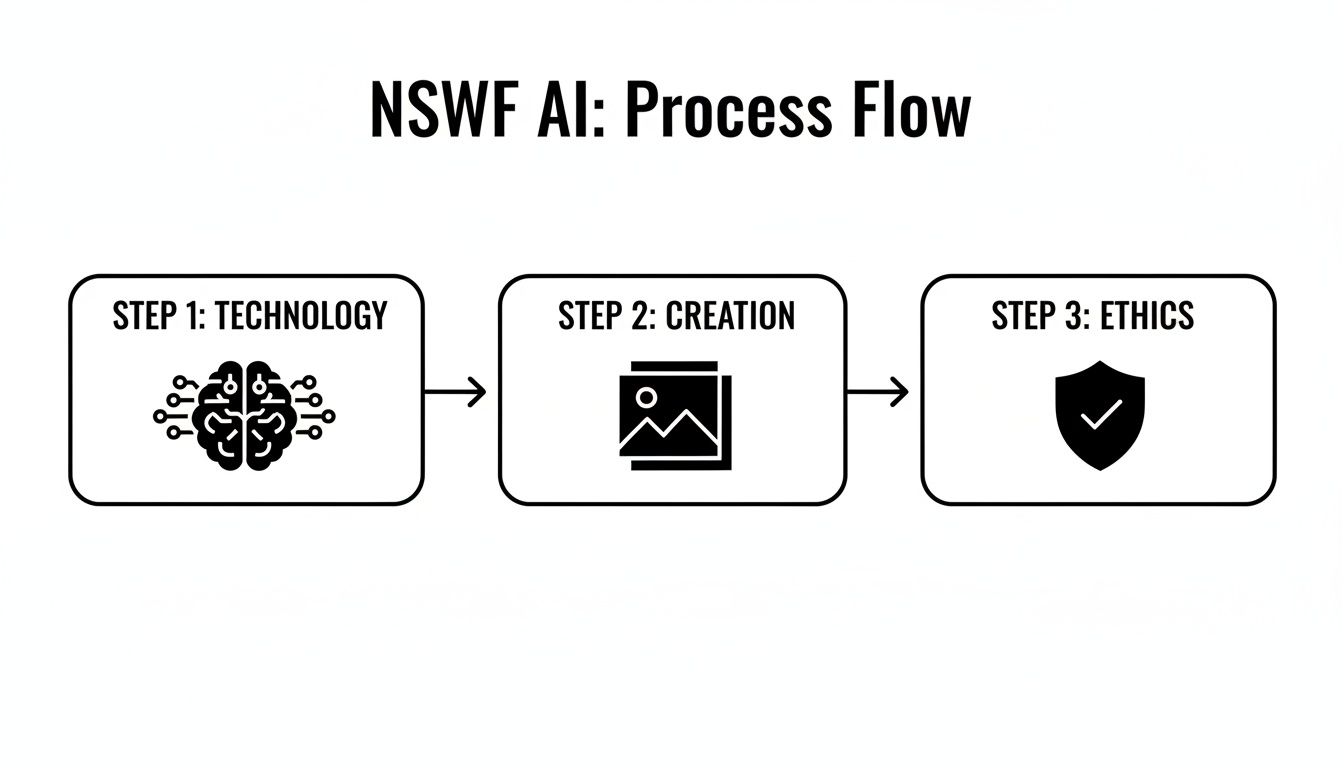
As you can see, making this work isn't just about the tech. It's a full workflow that demands a balance between creativity and responsible practices.
Path 2: The Web-Based Speed Run
The other path is using web-based platforms. These services are built for speed and simplicity. They handle all the complicated tech stuff behind the scenes. There’s no setup; you just sign up, maybe grab a subscription or some credits, and get right to prompting. This is a fantastic option if you're just starting out or if you value speed over ultimate control.
But that convenience comes at a price. You're walled into the platform's ecosystem, limited to the models and features they offer. You also have to play by their rules, which can be restrictive. More importantly, you're uploading your data to their servers. Some creators find excellent tools this way, and services like lunabloomai are a good example of what’s out there.
Privacy is everything. When you upload a personal photo to train a model or swap a face, you're handing over sensitive data. You have to read the privacy policy. Know exactly how your images are stored, used, and protected before you upload a single pixel.
Prepping Your Inputs: Garbage In, Garbage Out
Whether you're running a local setup or using a web service, one rule is absolute: the quality of your output is directly tied to the quality of your input. This is non-negotiable, especially when you're trying to capture someone's likeness.
To get a consistent, believable face, you need a killer set of reference photos. Here's what that looks like in practice:
- Go for Variety: Don't just use head-on shots. You need different angles—front, side, three-quarter views.
- Show Some Emotion: Include a range of expressions. Smiling, neutral, serious... the more data the AI has, the better.
- Keep Lighting Consistent: Try to use photos with similar, clear lighting. Harsh shadows or mixed lighting can really confuse the model.
- High Resolution is a Must: Use sharp, high-quality images. This gives the AI more detail to learn from, which translates into a much more accurate result.
If you're looking to take this further and build a complete AI persona, we've got more in-depth resources over at our main guides page that cover character consistency from top to bottom.
I can't stress this enough: a blurry, low-res photo will never give you a crisp, detailed AI image. You have to feed the AI enough clean visual information for it to understand the unique features of the face you're replicating. Skipping this prep work is probably the number one reason beginners get frustrated. Nail your setup and inputs, and you're building on a solid foundation.
Mastering the Craft of NSFW Prompting
The real magic in creating specific, high-quality ai generated nsfw images doesn't happen in the settings—it happens in the prompt box. Going from a generic picture to a compelling scene that matches your vision is all about how you talk to the AI. Think of it less like typing a search query and more like giving a detailed set of instructions to a highly skilled, but very literal, artist.
A great prompt is a recipe. You have to be explicit about everything, starting with your subject. Don't just say "woman"; describe her ethnicity, hair color, body type, and even the expression on her face. The more details you feed the AI, the less it has to guess, and the closer the result will be to what you imagined.
Building the Perfect Prompt Anatomy
How you structure your prompt is a bigger deal than most people realize. Models like Stable Diffusion read your prompt in order, giving more weight to the words that come first. Because of this, it's best to build your prompt from the most important elements down to the finer details.
I've found a formula that consistently works well:
- Subject & Core Action: Start with who or what is the focus. For example, "A woman with long silver hair, athletic build, sitting on a velvet couch."
- Detailed Descriptors: Now, add the juicy details. What is she wearing (or not wearing)? What’s her pose? What’s her mood? "wearing a black lace lingerie set, looking at the viewer with a playful smile."
- Scene & Environment: Paint the picture of the background. Where is she? "in a dimly lit penthouse apartment, city lights visible through the window."
- Artistic Style & Medium: This is what pulls it all together and defines the vibe. "photorealistic, cinematic lighting, shot on 35mm film."
Layering your prompt this way tells the AI what to prioritize, resulting in a much more coherent and intentional image.
Using Negative Prompts to Clean Up Your Art
One of the most powerful tools you have is the negative prompt. This is where you tell the AI exactly what you don't want to see. We’ve all seen the classic AI fails: mangled hands, extra limbs, and weirdly distorted faces. Negative prompts are your first and best defense against these common headaches.
A well-crafted negative prompt is just as important as the positive one. It's the difference between a near-perfect image and a mess of digital artifacts. Think of it as quality control before the image is even created.
Your negative prompt should be a running list of common mistakes and things you want to avoid. A solid, all-purpose negative prompt is a great starting point:
- Anatomical Fixes: malformed hands, extra fingers, mutated hands, poorly drawn hands, extra limbs, disfigured, bad anatomy.
- Quality Enhancements: blurry, low quality, jpeg artifacts, ugly, duplicate, morbid, mutilated.
- Style Control: text, watermark, signature, artist name, username, out of frame.
By using a strong negative prompt every time, you’ll dramatically cut down on the number of duds the AI spits out. It saves a ton of time and frustration by steering the model away from its known weaknesses from the get-go.
Advanced Prompting Techniques
Once you've got the basics down, you can start playing with more advanced syntax to really fine-tune your results. Prompt weighting is probably the most useful technique here. By using parentheses () and square brackets [], you can tell the AI to pay more or less attention to certain words.
In most Stable Diffusion interfaces, it works like this:
(blue eyes)increases the emphasis on "blue eyes." You can make it even stronger by nesting them, like((blue eyes)).[red hair]decreases the emphasis on "red hair."
This is a lifesaver when the AI is stubbornly ignoring a key detail. Let's say you want a specific outfit, but the model keeps generating something generic. Bumping up the weight on that term, like (delicate silk robe), can force the AI to listen.
Another cool trick is prompt mixing (or alternating syntax), which often looks like [word1|word2]. This tells the AI to switch between two concepts as it generates the image. You can use it to create really interesting hybrid styles or blend character features. For example, [blonde|brunette] could produce a hair color with complex highlights that isn't just one or the other. Getting the hang of these nuances is what separates a casual user from a true AI artist, giving you incredible control over the final look of your ai generated nsfw images.
Navigating Ethics, Safety, and Consent
Alright, let's talk about the serious side of this. When you start creating AI-generated NSFW images, you're stepping past the technical stuff and into a minefield of ethical responsibility. The lines here aren't blurry; they're razor-sharp, and crossing them has real consequences.
The single most important rule is this: never create non-consensual imagery of real, identifiable people.
I can't stress this enough. Doing this isn't some edgy artistic choice—it's image-based sexual abuse, plain and simple. We call them "deepfakes," and they are illegal in a growing number of places for a very good reason. They cause profound, lasting harm to victims. The power these tools give you comes with a heavy responsibility to use them ethically.
The Real-World Harm Is No Joke
It’s easy to think of this as a victimless act when you’re just sitting at a computer, but the damage is real and devastating. We’re not talking about a hypothetical problem; it’s a full-blown crisis that’s getting worse as the tech gets better.
Empirical research and news reports are full of stories about the fallout. You can read the full research on the documented harms of non-consensual AI imagery if you need a clearer picture. Victims face everything from extortion and blackmail to destroyed reputations and severe mental health trauma.
This is the reality of misuse. It’s not about pushing creative boundaries; it’s about violating a person's fundamental right to safety and privacy. Your first job as a creator is to make damn sure you aren’t part of the problem.
Your Core Responsibilities: A Safety Checklist
To do this responsibly, you have to operate with a strict set of non-negotiable rules. Think of this as the absolute minimum for working ethically in this space.
- Age Verification is Mandatory: You must have a system to ensure you aren’t creating or sharing content that involves minors. This goes for your audience, too—you need to make sure they're of legal age. Most platforms that allow adult content have their own strict protocols; learn them and follow them.
- Consent is Everything: The only time it’s okay to use a real person’s likeness is with their explicit, informed, and enthusiastic consent. This isn't a casual "sure, whatever." They need to know exactly how their image will be used and agree to it, preferably with a signed release. Without that, you're crossing a serious legal and ethical line.
- Respect Platform Rules: Every single service you use—from the AI tool itself to the social media site where you post—has a Terms of Service (ToS) agreement. Actually read it. Violating a platform’s ToS is the fastest way to get yourself banned, and in some cases, sued.
Your creative freedom ends where another person's safety and consent begin. There is no gray area here. The ethical path requires you to prioritize human dignity over artistic output, every single time.
Understanding Copyright in the Age of AI
Copyright law for AI art is a bit of a wild west right now, but a few key principles are starting to take shape. For instance, in many countries, a piece of art that is purely AI-generated, without significant human input, might not even be eligible for copyright protection. That has huge implications for protecting your work.
The bigger issue, though, is the training data. Most of the big AI models were trained by scraping billions of images from the internet, many of which were copyrighted. This creates a legal minefield. When you're picking a tool, try to find models that are transparent about their training data or use datasets that were sourced ethically.
You also need to be careful about using the likenesses of celebrities or characters from existing movies, games, or shows. Just because you can generate an image of a famous actor in a compromising position doesn't mean you should. Doing it for commercial purposes is practically begging for a cease-and-desist letter or a lawsuit.
For those looking to turn this into a business, our CreateInfluencers blog dives deeper into building a brand while staying on the right side of these complex issues. At the end of the day, operating ethically means staying informed and always respecting the rights of others—both individuals and copyright holders.
Polishing Your AI Art with Post-Processing
Think of the "generate" button as the first rough sketch, not the final product. A raw AI image is a fantastic starting point, but the real magic happens in post-processing. This is where you roll up your sleeves, fix the AI's weird quirks, and turn a decent render into something truly professional.
If you have any experience with digital art, you're already ahead of the game. Your skills in Adobe Photoshop, GIMP, or Clip Studio Paint are about to become your secret weapon. The best work comes from blending the raw generative power of AI with the careful touch of a human artist.
This hybrid approach is how you correct those little mistakes, punch up the lighting, and tweak the composition to give your ai generated nsfw images a deliberate, polished look that really stands out.
Upscaling for High-Fidelity Detail
Most AI models will spit out images at a fairly low resolution, often around 1024x1024 pixels. That’s okay for a quick preview on a phone, but it's not going to cut it for high-quality prints or detailed close-ups on a larger screen. The solution? Upscaling.
And no, just stretching the image in Photoshop won't work—you'll end up with a blurry, pixelated mess. You need a specialized AI upscaler that intelligently adds new detail as it increases the resolution, keeping everything sharp. Tools built on models like ESRGAN (Enhanced Super-Resolution Generative Adversarial Networks) are the industry standard for a reason.
Luckily, many popular Stable Diffusion interfaces, like AUTOMATIC1111, have these tools baked right in. You can generate an image and send it straight to the upscaler, often doubling or quadrupling the resolution in a matter of minutes.
Pro Tip: The upscaling model you choose makes a huge difference. Some are trained for photorealism, while others excel at anime or painterly styles. Test a few to see which one preserves the unique style of your image while adding crisp, believable detail.
Correcting Common AI Flaws
Let's be honest: AI gets things wrong. A lot. Even the most advanced models can produce mangled hands, uncanny eyes, and bizarre visual artifacts that can kill an otherwise great image. This is where your post-processing skills really shine.
Inpainting is your best friend for these kinds of targeted fixes. This feature, found in most AI tools, lets you draw a mask over a problem area—like that infamous six-fingered hand—and have the AI regenerate only that little section.
By giving the AI a new, highly specific prompt for the masked area (like "a delicate female hand, five fingers, resting on a table"), you can fix the error without touching the rest of the image. It might take a few tries to get it perfect, but mastering inpainting is non-negotiable for producing clean, professional art.
AI-generated art is notorious for a few recurring issues. Here's a quick look at how you can tackle them using post-processing.
Common AI Image Flaws and Fixes
| Common Flaw | Post-Processing Technique | Recommended Tool(s) |
|---|---|---|
| Malformed Hands/Feet | Use inpainting with a very specific prompt. | AUTOMATIC1111, Photopea, Photoshop |
| Uncanny or Dead Eyes | Inpainting to correct gaze and shape; manual edits for highlights. | Adetailer extension, GIMP, Photoshop |
| Weird Artifacts/Glitches | A mix of inpainting for larger areas and manual touch-ups. | Clone Stamp & Healing Brush in Photoshop |
| Blurry or Soft Details | AI upscaling followed by manual sharpening filters. | Topaz Gigapixel AI, ESRGAN models |
| Poor Lighting/Shadows | Manual painting of highlights and shadows on new layers. | Photoshop (Dodge/Burn tools), GIMP |
These techniques give you the control to iron out the imperfections that scream "this was made by an AI," elevating the final quality of your work.
The Final Polish in an Image Editor
With the AI-specific glitches fixed, it's time to bring your image into a dedicated photo editor for the final touches. This is where you stop thinking like an AI prompter and start thinking like a photographer or digital painter.
This last stage is all about artistic refinement:
- Color Grading: This is where you define the mood. Adjusting the contrast, saturation, and overall color balance can transform a flat image into a cinematic scene.
- Lighting Effects: Go beyond what the AI gave you. Manually paint in some dramatic highlights, deepen the shadows, or add a subtle lens flare to make the lighting feel more intentional and dynamic.
- Compositional Tweaks: Don't be afraid to crop the image to create a stronger focal point. You can also use liquify or warp tools to make subtle adjustments to proportions and flow.
This is where your personal style comes to life. By seamlessly blending AI generation with classic digital art techniques, you take back full creative control. You’re no longer just generating images; you’re genuinely crafting them.
Turning Your Creations Into Cash and Building a Fanbase
Making a real income from your art is about more than just talent; it requires a sharp business sense. When you're working with AI-generated NSFW images, your first make-or-break decision is where to host your work. Forget mainstream sites—their policies are a minefield. Instead, focus on creator-first platforms like Patreon and Fanvue, which are built around the subscription models that give adult creators a steady, predictable income.
Building a loyal audience in this space hinges on two things: consistency and a strong brand. Don't just throw random images out there. Cultivate a distinct style or create a lineup of virtual personas that your followers can get invested in. A regular posting schedule does wonders for engagement and shows everyone you're serious. This guide on how to monetize online content is a fantastic resource if you're looking to turn this from a hobby into a real business.
Tackling Platform Headaches
One of the biggest hurdles you'll face is getting paid. Mainstream payment processors like Stripe and PayPal are famously hostile to adult content, and you don't want to wake up to a frozen account. This is where platforms like Fanvue really shine—they’ve already figured out the tricky payment logistics so you don't have to.
If you decide to go it alone, you absolutely must find payment gateways that are openly adult-business friendly. It'll save you a world of hurt. And for those really looking to grow their earnings, checking out our affiliate program is a great way to add another revenue stream.
You'll also be your own content moderator, which means you're responsible for making sure your work follows both platform rules and the law.
The real challenge is that automated moderation is a clumsy tool. Even the best systems can't always tell the difference between artistic expression and prohibited content. Your own judgment is the only thing standing between you and a potential ban.
Don't just take my word for it. Studies have shown that automated NSFW classifiers can have error rates anywhere from 4.1% to a whopping 36%. Simple edits can often trick these systems completely. Being aware of these limitations is key to protecting your account.
Smart Pricing and Product Ideas
The secret to maximizing your income is to give people multiple ways to support you. Don't just rely on one thing.
Here are a few models that work really well:
- Tiered Subscriptions: Create different access levels. A basic tier could offer your standard posts, while higher tiers unlock exclusive content, behind-the-scenes looks, or even the power to vote on future image themes.
- Custom Commissions: Offer to create personalized images for a premium. This can be incredibly lucrative, but you have to be careful to manage your time and avoid burning out. Set clear boundaries and prices from the start.
- Themed Content Packs: Bundle your work into curated collections—think "Cyberpunk Nights" or "Fantasy Boudoir"—and sell them as digital downloads. It’s a great way to earn from your back catalog.
Frequently Asked Questions
When you first dive into the world of AI-generated NSFW art, a ton of questions pop up. I get it. We're all navigating this new space together, so let's tackle some of the most common things people ask about legality, the best tools for the job, and how to fix those frustrating glitches.
Is It Legal to Create AI Generated NSFW Images?
This is the big one, and the answer is: it's complicated. The legality really hinges on what you're creating and where you live. If you're generating images of completely fictional characters you invented, or even of yourself with your own consent, you're generally on safe ground for personal use.
The line gets crossed, hard and fast, when real people are involved without their permission. Creating non-consensual deepfakes of an identifiable person is illegal in a growing number of places and is rightly considered a form of image-based sexual abuse. Seriously, don't do it. It’s your responsibility to know the laws in your specific region—local, state, and national—before you even think about generating.
What Is the Best AI Model for NSFW Content?
There’s no single "best" model, just the best one for you. It really boils down to what you want to achieve and how much you're willing to tinker.
For Total Creative Freedom: If you're a control freak like me, nothing beats running Stable Diffusion locally. With custom models (checkpoints) and character-specific LoRAs, the power is all yours. The trade-off? You need a beefy computer and the patience to learn the ropes.
For Simplicity and Speed: Don't want the tech headache? There are a ton of web-based AI services popping up that cater specifically to adult content. They’re super easy to use—you can get started in minutes—but you sacrifice a lot of the fine-tuned control you'd have running it yourself.
Think about what matters more: ultimate control or push-button convenience. Your answer will point you to the right tool.
How Can I Fix Common Flaws Like Bad Hands or Eyes?
Ah, the classic AI nightmare: the six-fingered hand or the wandering eye. Fixing these is a mix of good prep work and smart clean-up.
First, you can prevent a lot of issues right from the start by using strong negative prompts. Think of it as telling the AI what not to draw. I always include a block of terms like "malformed hands, extra fingers, poorly drawn face, disfigured, mutated" in my negative prompts. It helps a ton.
When you still get glitches (and you will), it's time for post-processing. A tool with an inpainting feature is your best friend here. You just paint a mask over the messed-up hand or eye, and the AI will try again, regenerating just that little spot. For faces, some tools have specific face-fixing extensions (like Adetailer for Stable Diffusion) that automatically spot and correct weird faces, which is a massive time-saver.
Ready to create stunning, high-quality AI influencers and visuals without the steep learning curve? CreateInfluencers offers powerful tools for one-click character creation, face swapping, and generating adult content for platforms like OnlyFans and Fanvue. Start for free today.